
How to Create M3U and Xtream Codes for Your IPTV Subscription in a Few Easy Steps
M3U playlists and Xtream Codes are the two main login systems used in IPTV subscriptions and Reseller panels. Whether you are buying IPTV or starting an IPTV reseller business, understanding how these work helps you manage users, devices, and streaming access correctly.
Starting an IPTV reseller business is not rocket science. To succeed in selling an IPTV subscription, you only need two things: a smooth service and easy-to-use access codes.
This guide will help you understand and generate the two main types of digital keys using your best IPTV panel: M3U Playlists and Xtream Codes. This isn’t about complicated settings; it is about serving customers quickly and efficiently.
IPTV Reviews according to Reddit
Your Digital Command Canter The Reseller Dashboard:
As an IPTV reseller in 2026, you manage your whole business from a dashboard. This is your control panel used by you, as a merchant, to manage each single IPTV subscription and track your success.
How to Convert an M3U Link to Xtream Codes (Easy Guide)
If you’re using IPTV, you might have come across M3U links and Xtream Codes login details. Many users prefer Xtream Codes because it’s easier to use and works smoothly with most apps. The good news is—you can quickly convert an M3U link into Xtream Codes format by following a simple method.
What Does an M3U Link Look Like?
A typical M3U URL looks like this:
http://xyz.cloud.12/get.php?username=99887711&password=7665142&type=m3u_plus&output=ts
At first glance, it may look complicated, but it actually contains all the details you need.
Step 1: Remove Unnecessary Parts
To begin, you need to clean up the link by removing extra sections that are not required. Specifically, remove:
-
get.php? -
&type=m3u_plus&output=ts
This helps you focus only on the important information.
Step 2: Find Your Login Details
Now, look closely at the link:
-
The username is the number after
username=→99887711 -
The password is the number after
password=→7665142
These will be used to log in via Xtream Codes.
Step 3: Get the Server URL
The main part of the link (before /get.php) is your server URL.
For example:
http://xyz.cloud:00
Make sure you include the correct port number (like :80, :8080, or :8880), as this can vary depending on your provider.
Final Xtream Codes Format
After converting, your details should look like this:
-
URL:
http://xyz.cloud:00 -
Username:
99887711 -
Password:
7665142
Quick Overview of Your Panel’s Power
| Dashboard Metric | What it Means for You | Reseller Benefit |
| Active Subscriptions | The number of users currently paying for an IPTV subscription. | A direct measure of your current income and stability. |
| Total Lines | The total number of accounts you have ever created. | Tracks capacity and future sales potential. |
| Open Connections | How many users are streaming right now. | Helps you check server load and troubleshoot service issues. |
| App Access URLs | The principal portal link required for smart applications and set-top boxes. | The necessary link to easily configure the Xtream Code method. |
The most important part of this panel is the Line Management area. This is where the keys (credentials) for every IPTV subscription you sell are kept.
M3U vs Xtream Codes — Which One Is Better?
| Feature | M3U | Xtream Codes |
|---|---|---|
| Beginner friendly | ❌ | ✅ |
| Panel control | ❌ | ✅ |
| Reseller usage | Limited | Best |
| Auto updates | No | Yes |
Access Codes: Understanding M3U vs. Xtream
When a customer pays for an IPTV subscription, you give them one of two things: a single M3U link or a set of three Xtream Codes login details. They both access the same content, but they use different methods.
1. The M3U Playlist: The Universal Link
Definition: The M3U playlist is a single long URL (link) that works on almost any player, from VLC Media Player on a PC to certain apps on a Smart TV. This is the easiest, most universal way to start an IPTV subscription.
How the M3U Link is Built
Your best IPTV panel creates this link for every user automatically. The link combines three pieces of information into one long string:
-
Server Address: Where the content is located.( Some famous Reseller panels has modified their Reseller panel for m3u only in January 2026 so servers are down or with load but there is a new way that is addition of custom domain. You can contact us for this purpose we will charge a little amount and service willl be fine again.)
-
Username: The unique user ID (e.g., UELU5785).
-
Password: The secret code (e.g., 836738HJ).
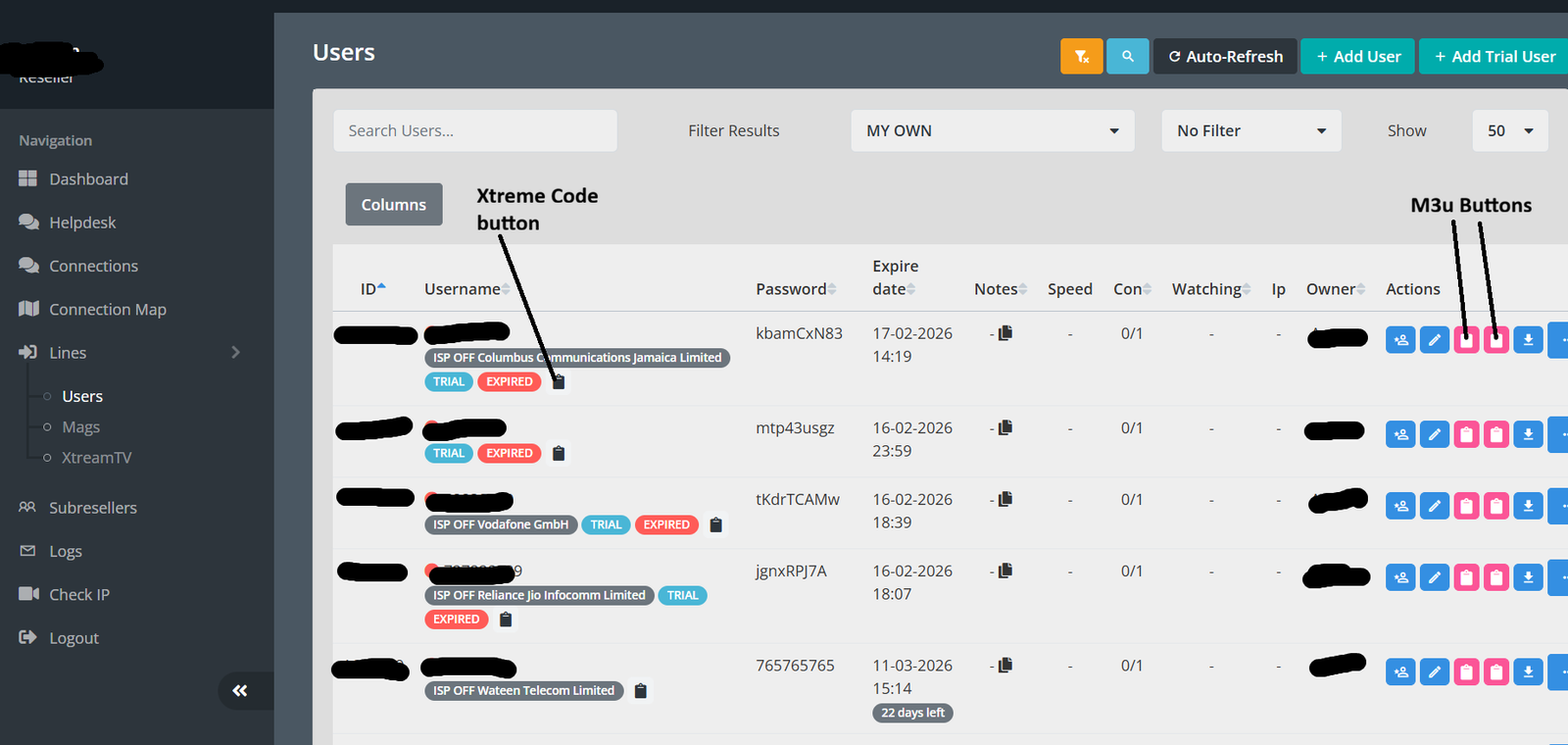
The Red Clipboards
In your dashboard, you will see two red clipboard icons next to the user details. These are for copying the M3U link:
-
Left Clipboard (Standard M3U): This generates the basic link. It works everywhere but might not show channel logos or a full TV guide (EPG).
-
Right Clipboard (M3U+ / M3U_Plus): Always use this option. This link contains extra information, allowing modern players to display channel logos, categories, and a full EPG. This ensures a premium IPTV subscription experience.
Generation Step-by-Step (M3U)
-
Go to ‘Lines’ in your panel menu.
-
Find the customer’s Username (e.g., UELU5785).
-
Click the right red clipboard (M3U+) in the Actions column.
-
The entire M3U link is copied immediately. You provide this link directly to the customer.
2. The Xtream Code: How to Login with Smart App
Definition: Xtream Codes are not a link. They are a set of three login details used by popular apps like Smarters or TiviMate. These apps provide the most stable and feature-rich way to enjoy an IPTV subscription.
The underlying principle is simple: the username and passwords you see in your panel will serve as the Xtream Code.
The Three Xtream Codes Credentials
You must send these three specific items to the customer:
-
Portal URL: Found in the App Access URLs section of the dashboard.
-
Username: Example: UELU5785 (from your Lines list).
-
Password: Example: 836738HJ (from your Lines list).
Step-by-Step Generation (Xtream Codes)
-
Go to the App Access URLs section and copy the Portal URL (this is the main link).
-
Navigate to ‘Lines’ and write down the specific Username and Password for the customer.
-
Send these three pieces of information to the customer so they can log in to their Xtream Codes compatible app.
Marketing and Management: Features of the Best IPTV Panel
An IPTV reseller in the UK or anywhere globally needs tools to increase sales. The best IPTV panel provides these through Line Management features.
A. The Power of the IPTV Trial
The ‘TRIAL’ label in the line management section is your best sales tool. A short, no-obligation IPTV trial is the quickest way to turn a visitor into a customer.
-
Instant Creation: Create a 24-hour IPTV trial with one click.
-
Automatic Expiration: The system handles the expiry time; you do not need to monitor it manually. It will simply show an ‘EXPIRED’ status when done.
-
Easy Conversion: Once the trial is successful, use the ‘Edit’ action button (the pencil icon) to easily extend the account to a full paid IPTV subscription.
B. Fundamental Control: The Actions Column
The icons in the ‘Actions’ column next to each IPTV subscription are your daily tools:
-
Edit/Pencil: Change details, extend the expiry date, or change the package (e.g., converting an IPTV trial to paid).
-
Suspend/Lock: Temporarily disable the account. Use this for non-payment or if a customer asks to put it on hold.
-
Delete/Trash: Permanently remove the IPTV subscription. Use this to clean up old, expired lines to free up server space.
-
Info/Log: See what content the user is viewing and check their connection history. This is very important for troubleshooting ‘buffering’ complaints.
C. Connection and Monitoring
Look at the Con (Connections) column. This shows a ratio like 0/1.
-
0/1: The user has a limit of 1 connection, and currently, zero are being used.
-
1/1: The user is maxed out and cannot login on another device.
-
2/1: This indicates a customer may be sharing their IPTV subscription. This should be addressed or upsold to a multi-connection package.
This gives you real-time monitoring to assure service quality for every IPTV reseller.
Frequently Asked Questions About M3U & Xtream Codes
What is an IPTV Xtream Codes login?
An Xtream Codes login is a access system used by IPTV providers to connect users directly with their streaming server through a username, password, and server URL. Unlike simple playlist links, this method allows automatic channel updates, better stability, and easier account management with an IPTV panel.
Is an M3U playlist different from Xtream Codes?
Yes. An M3U playlist is basically a file or link containing channel URLs. While Xtream Codes connects through a server panel. M3U works well for manual setups, but Xtream Codes is more advanced because it organizes channels, VOD, and user permissions automatically.
Which login method is better for IPTV resellers?
Most IPTV resellers prefer Xtream Codes because it allows them to create users, renew subscriptions, and manage devices directly from a reseller panel. M3U links are harder to control and usually require manual updates.
Can I use both M3U and Xtream Codes on the same subscription?
In many cases, IPTV providers generate both login types from the same server account. Users can choose whichever format works best with their device or application, depending on compatibility.
Why do IPTV providers recommend Xtream Codes instead of M3U?
Xtream Codes reduces buffering issues, supports automatic updates, and improves server security. Providers also gain better control over connections, which helps maintain streaming performance for all users.
Do IPTV apps support both formats?
Most modern IPTV applications such as Smart IPTV players, Android TV apps, and mobile IPTV apps support both M3U playlists and Xtream Codes login systems, although Xtream Codes usually provides a smoother setup experience.
Overview: Simple Maths, Powerful Business
The main task of an IPTV reseller is to rapidly and precisely provide access codes for an IPTV subscription.
-
For maximum compatibility, copy the M3U+ URL (right red clipboard).
-
For smart applications, provide the Portal URL, Username, and Password (Xtream Codes).
Remember, the login details are the same in both cases: the username and passwords serve as the Xtream Code, and those same details are hidden inside the M3U link.Only addith is .php or few question mark like symbols.
By mastering these simple steps, you can devote less time to technical details and more to sales, turning a humble IPTV trial into a long-term profitable IPTV subscription business. Because your best IPTV panel is efficient, managing accounts is a breeze, ensuring your customers in the UK and everywhere else can access their service instantly.