
IPTV for Cable Replacement (2026): What Actually Works
A subscriber cancels cable, signs up for an IPTV service, and within three weeks they’re back on the phone with their old provider asking to be reconnected. We’ve seen this pattern play out hundreds of times, and it’s almost never because IPTV doesn’t work. It’s because nobody told them what cable replacement actually requires before they made the jump.
The Quick Answer: Does IPTV Actually Replace Cable in 2026?
Yes, IPTV for cable replacement works reliably in 2026, but only when three conditions are met: a stable internet connection of at least 25-30 Mbps, a provider with multiple backup servers, and realistic expectations about live sports during peak traffic. Skip any one of these and the “IPTV doesn’t work” complaints start within the first month. The technology has matured significantly, but the gap between a good setup and a bad one is wider than most new subscribers realize.
The biggest myth we keep hearing is that IPTV is just “internet cable” — the same channels, same reliability, just delivered differently. That’s not quite right, and pretending otherwise is what causes most of the buyer’s remorse we see.
Why Most People Underestimate What IPTV for Cable Replacement Requires
Cable television doesn’t care about your other household traffic. IPTV does. After reviewing hundreds of support requests, we noticed a clear pattern: complaints about buffering almost always trace back to households running multiple streams, smart home devices, and video calls on the same connection without enough headroom.
Pro Tip: Before switching, run a speed test during your household’s peak usage hour — not at 3am when nobody’s online. That number is your real ceiling, not the number your ISP advertises.
This isn’t a flaw in IPTV. It’s a structural difference. Traditional cable uses a dedicated coaxial signal; IPTV rides on the same pipe as everything else you do online.
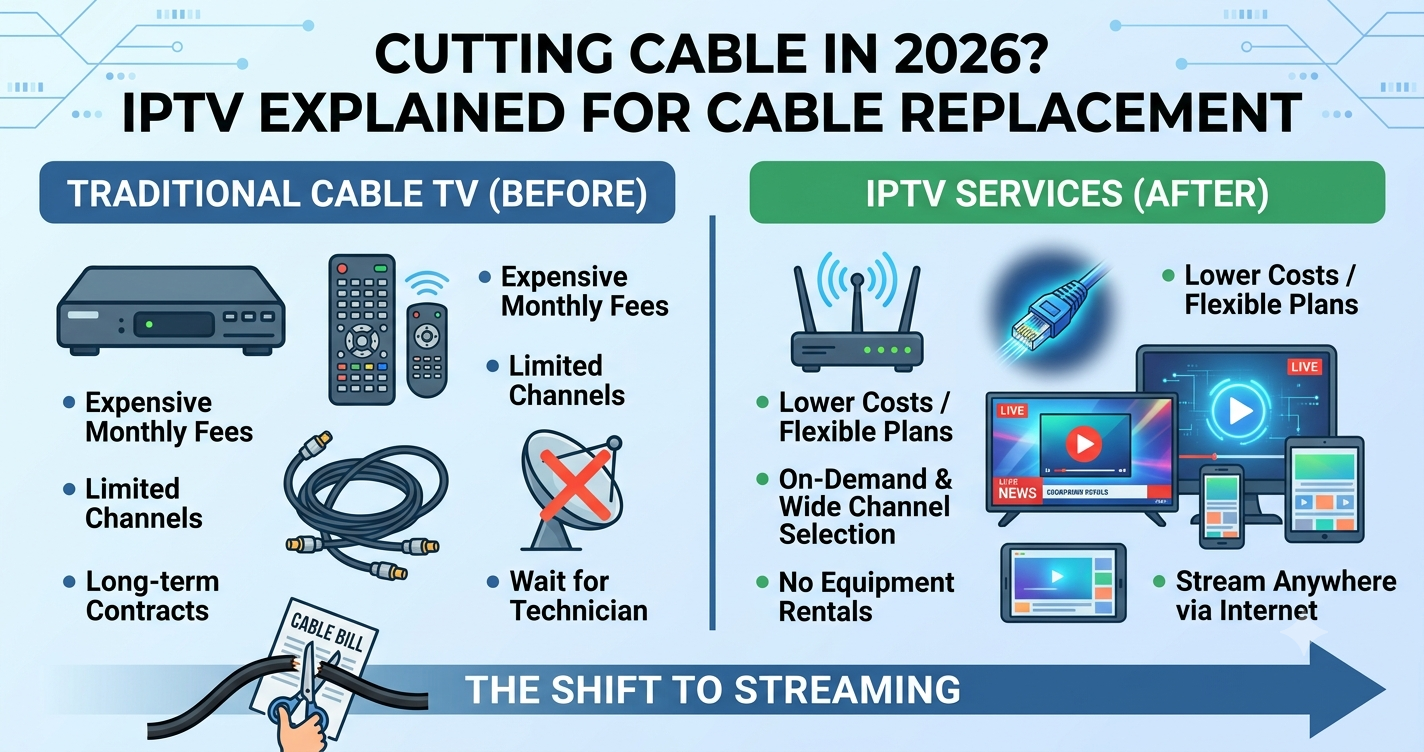
Cable vs IPTV: A Direct Comparison
| Factor | Traditional Cable | IPTV (2026) |
|---|---|---|
| Delivery method | Dedicated coaxial signal | Internet (shared bandwidth) |
| Channel switching | Instant | Near-instant with good provider, delayed with poor infrastructure |
| Device flexibility | Limited to cable boxes | Firestick, Android TV, Smart TV, tablets, phones |
| Cost over time | Fixed but high | Lower, but quality varies by provider |
| Peak event reliability | Unaffected by traffic | Depends entirely on provider’s server capacity |
| Outage transparency | Provider-reported | Often silent unless you check forums |
That last row matters more than people think. When cable goes down, you get a notification. When an IPTV server gets overloaded during a big match, you just get a frozen screen and no explanation — unless the provider has decent monitoring and actually tells you what’s happening.
What Breaks First: The ISP Throttling Problem Nobody Mentions
During a major football tournament weekend last year, we watched ISP-level throttling kick in across several UK households around the same time — not because the IPTV provider failed, but because deep packet inspection (DPI) flagged the traffic pattern and the ISP quietly deprioritized it. The subscribers blamed the service. The actual cause was upstream.
This is a 2026 reality that wasn’t as pronounced even two or three years ago. ISPs have gotten better at fingerprinting streaming traffic, and some throttle it during high-demand windows regardless of which service you’re using.
- A VPN can sometimes bypass DPI-based throttling, though it adds a small amount of latency
- Wired ethernet connections are far less prone to the packet loss that triggers throttling flags than congested Wi-Fi
- Providers using multiple CDN routes are more resilient to this than single-source setups
Why Sports Are the Real Stress Test for IPTV Cable Replacement
Anyone evaluating IPTV for cable replacement needs to think about live sports separately from everything else. Movies and TV shows are forgiving — a few seconds of buffering during a drama doesn’t ruin the experience. A goal you miss because of a freeze during a live match is a different kind of frustration entirely.
During the 2026 World Cup buildup, we’ve already seen smaller IPTV operators publicly acknowledge capacity strain during marquee fixtures. This isn’t a knock against IPTV as a concept — it’s a reminder that infrastructure quality separates providers far more than channel lists do.
Mini Case Study: One Household’s Switch
A family of four in Manchester replaced cable with IPTV in early 2026. First month: constant buffering during evening hours when all four devices were active. After upgrading their router and switching to a provider using load-balanced servers across multiple regions, the buffering issue disappeared almost entirely. The service didn’t change — the infrastructure underneath it did.
The Hidden Cost of Choosing the Cheapest IPTV Option
The cheapest IPTV for cable replacement deals usually cut corners in one specific place: server redundancy. A single-source setup with no failover looks identical to a properly built one — until traffic spikes.
Pro Tip: Ask any potential provider directly whether they use failover systems and backup uplinks. A vague answer is itself the answer.
Checklist: What to Verify Before You Cancel Cable
- Confirm your actual upload and download speeds during peak hours
- Check whether the provider has multiple server regions, not just one
- Ask about their EPG (electronic programme guide) update frequency
- Test the trial period during a busy evening, not a quiet afternoon
- Confirm device compatibility (Firestick, Android TV, Smart TV, tablet)
- Read recent user feedback specifically about sports stream stability
DNS Routing and Why It Matters More Than People Realize
DNS poisoning and inconsistent DNS routing are two of the quieter reasons IPTV connections degrade over time. When a provider’s DNS infrastructure isn’t properly maintained, channels that worked fine yesterday suddenly fail to load today — not because the content disappeared, but because the routing path got disrupted. Providers that actively monitor and rotate DNS infrastructure tend to have far fewer of these silent failures.
Device Compatibility: Where Cable Replacement Actually Gets Easier
This is genuinely one area where IPTV for cable replacement outperforms cable outright. A single subscription typically works across Firestick, Android TV, Samsung and LG Smart TVs, Apple TV, and tablets — something cable boxes never offered. For households with multiple TVs, this flexibility alone often justifies the switch, separate from any cost savings.
FAQs
Is IPTV a good replacement for cable in 2026?
Yes, for most households, IPTV for cable replacement is a solid option in 2026 — provided your internet connection can handle peak usage and you choose a provider with reliable server infrastructure rather than the cheapest listing you find.
Why does IPTV buffer more than regular cable?
IPTV shares your home internet connection with every other device you use, while cable has a dedicated signal. Buffering usually comes from insufficient bandwidth, ISP throttling, or a provider without proper failover systems — not from IPTV itself being unreliable.
Do I need special equipment to switch to IPTV for cable replacement?
No special equipment is required beyond a streaming device you likely already own — Firestick, Android TV box, or a smart TV with an app. A stable router and sufficient internet speed matter far more than any hardware purchase.
Will IPTV work during major sporting events?
It depends heavily on the provider’s infrastructure. Services with multiple backup servers and load balancing handle traffic spikes during major matches far better than single-source providers, who often struggle during exactly the moments subscribers care about most.
How much internet speed do I need for IPTV?
A minimum of 25 Mbps is recommended for a single HD stream, with more needed for multiple simultaneous streams or 4K content. Always test during your household’s busiest hours, not when the connection is idle.
Is IPTV legal?
IPTV technology itself is legal — it’s simply a method of delivering television over the internet. Legality depends on whether the specific service has proper rights to distribute the content it offers, so it’s worth researching any provider before subscribing.
Can IPTV resellers offer better support than large providers?
Often yes. A smaller IPTV reseller or sub-reseller typically provides more direct, responsive support than a large impersonal operator, since their reseller panel and customer base are smaller and more manageable.
What should I look for in an IPTV reseller panel before buying credits?
Check that the reseller panel offers multiple server regions, transparent panel credits pricing, and responsive support. A reliable IPTV reseller will be transparent about infrastructure rather than just listing channel counts.
Checklist for Subscribers
- Test your connection speed during peak hours before subscribing
- Confirm multi-device compatibility with your specific TVs and streaming boxes
- Use the trial period during a high-traffic evening, ideally with a live match running
- Ask the provider directly about failover and backup servers
Checklist for Resellers
- Choose an IPTV reseller panel with verified multi-region server infrastructure
- Monitor panel credits usage trends to forecast customer growth accurately
- Track support ticket patterns weekly to catch recurring infrastructure issues early
- Maintain transparent communication with customers during major sporting events
Checklist for Sub-Resellers
- Confirm your upstream IPTV reseller has documented failover systems
- Set realistic customer expectations about sports-event traffic spikes
- Keep a direct line to your panel owner for fast escalation during outages
- Avoid overselling panel credits beyond what your support capacity can handle
For UK IPTV resellers building out IPTV for cable replacement offers, working with britishseller.co.uk as part of your infrastructure planning gives sub-resellers and panel owners a more dependable foundation than chasing the cheapest available reseller panel.
Final Insight
The households that succeed with IPTV for cable replacement in 2026 are the ones who treated it as an infrastructure decision, not just a subscription swap. Bandwidth, provider redundancy, and realistic expectations around live sports matter more than channel count ever will. Get those three right, and cable starts to feel unnecessary rather than missed.