
IPTV Reseller Support Guide: How to Keep Subscribers Renewing in 2026
Support quality is where most reseller operations either build a real business or slowly bleed subscribers until the numbers don’t work anymore. It’s not glamorous, it’s not the part anyone talks about when they discuss getting into this market, but it’s the variable that determines whether your monthly renewal rate is 85% or 65%. That gap compounds dramatically over six months.
This guide covers what good support infrastructure actually looks like, how to use the management platform to make support faster and more effective, and the specific mistakes that turn manageable situations into churn.
Before getting into it: this platform provides subscription management software only. It does not host television channels, stream media content, or distribute copyrighted material. The support guidance here is for managing your subscriber relationships, not for content delivery.
[ez-toc]
Why Support Quality Determines Your Renewal Rate
The subscriber’s alternative is always one message away. They can switch to a different reseller, find a free playlist, or just cancel and revisit the decision later. The switching cost is low.
What keeps subscribers renewing despite that is trust, specifically the belief that if something goes wrong, you’ll fix it quickly. Every support interaction either builds or erodes that trust. A fast, helpful resolution to a connection issue often creates a more loyal subscriber than someone who never had an issue at all.
The IPTV reseller Panel who achieve 90%+ monthly renewal rates almost uniformly share one characteristic: they treat support not as a reactive burden but as a proactive retention tool. That mindset shift changes how they configure their panel, how they communicate with subscribers, and how they structure their time.
Using the Dashboard for Proactive Support
The single most underused support capability in the management platform is the analytics section’s connection failure logs. Most resellers check this only when they’re already getting messages. The ones with the lowest churn rates check it daily before any subscriber contacts them.
Here’s what that looks like in practice: log in every morning, open the analytics panel, and look at the connection failure rate for the last 24 hours. Normal baseline might be 1 to 2% of connection attempts resulting in errors. If that number jumps to 5% or higher on a specific channel category, something is wrong with that supplier stream. You now have two to five minutes to identify which subscribers are likely affected and send a proactive message before your inbox fills up.
“Hey, we noticed some connection issues with the sports channels this morning and we’re working on it, here’s the backup channel link in the meantime.” That message, sent before the subscriber even encountered the problem, is worth more in retention value than ten reactive support responses.
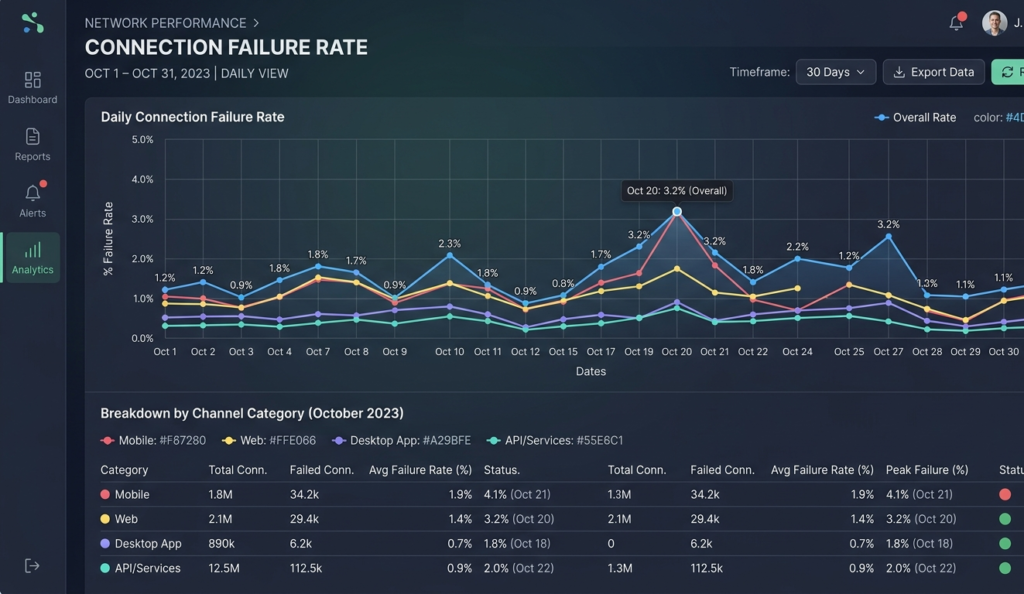
Analytics panel showing connection failure rate chart with daily view and channel category breakdown
The live connections monitor refreshes every 30 seconds. During major events, Champions League finals, heavyweight boxing, weekend Premier League, watch this in real time. If you see an unusual spike in error rates alongside a surge in connections, you’re seeing server overload happening live. That’s the moment to check your supplier’s status and communicate with subscribers before they start messaging you.
Building a Support Infrastructure That Doesn’t Require You to Be Available 24/7
The timezone problem is real. UK and USA subscribers have peak usage hours at opposite ends of the clock. You can’t be personally responsive across both without burning out. The solution is building infrastructure that handles the first line of support automatically, so your personal responses are reserved for situations that genuinely require them.
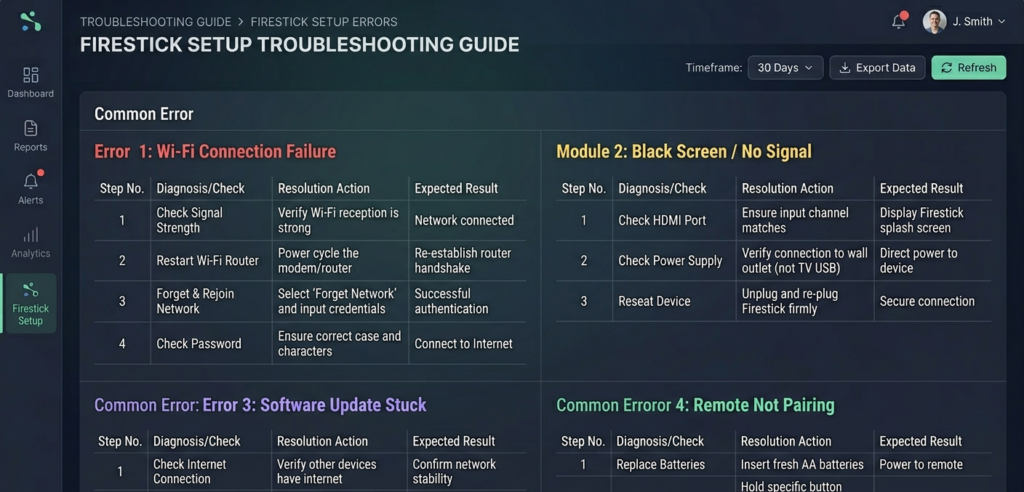
Layer 1: Device-specific setup guides. Every support message about “how do I set this up?” is a failure of onboarding documentation. Create setup guides with screenshots for the four most common device types: Firestick, Samsung/LG Smart TV, iOS, and Android. Send these with every set of credentials. Put them on your website. When someone can’t set up their device at 11pm your time, they should be able to find the answer without waiting for you.
Setup guides take three to four hours to create properly. That upfront investment saves hours per week indefinitely as your subscriber base grows.
Layer 2: Troubleshooting documentation. The five questions you answer most often should have written answers on your website. “Why is my stream buffering?” “Why does it say authentication error?” “How do I update my credentials?” “Which app should I use on my Samsung TV?” These questions are answerable with step-by-step guides. Every subscriber who resolves their own issue through documentation is a subscriber who doesn’t need to wait for you to respond.
Layer 3: Help desk software. A basic help desk, even free tiers of tools like Freshdesk or Zendesk, provides several things you can’t replicate in WhatsApp or Telegram threads: organised ticket history per subscriber, response time tracking, template responses for common issues, and the ability to see open and resolved issues at a glance.
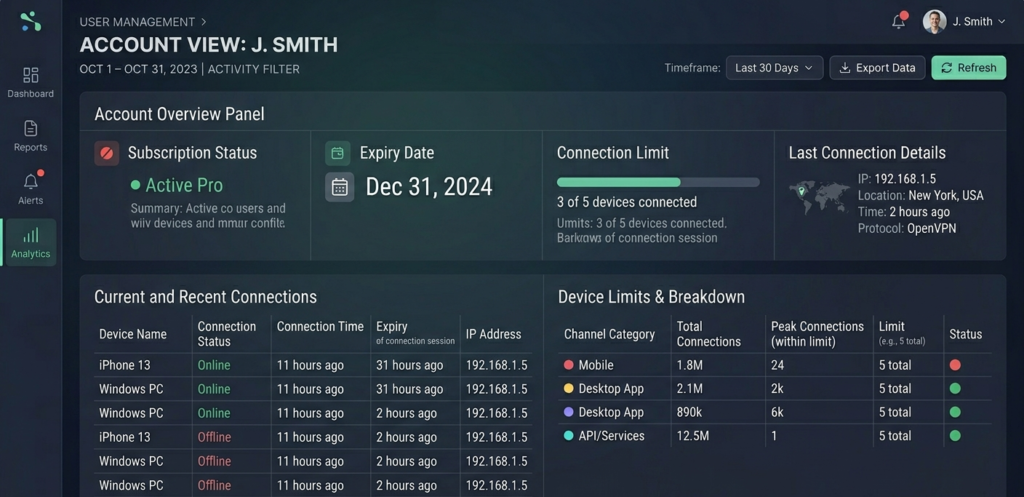
The integration with your IPTV reseller panel’s CRM section is what makes this powerful. When a subscriber opens a ticket, pull up their account in the User Management tab. You can see their subscription status, connection history, last login, device type, and any previous support notes before you respond. That context transforms your support from generic troubleshooting to accurate, efficient resolution.
Common Support Issues and How to Resolve Them Using the Panel
Authentication error on login: first check the User Management tab. Is the account active and within its subscription period? Is the connection limit set correctly? Has the account expired? This resolves 80% of authentication error reports in under two minutes.
Stream buffering or freezing: this can be a client-side issue (their internet connection, their device, their app’s buffer settings) or a supplier-side issue (server load, stream quality). Check the connection failure logs in analytics for the time period the subscriber reported the issue. If you see elevated failure rates across multiple accounts simultaneously, it’s supplier-side. If only their account shows issues, troubleshoot device and network first.
App showing wrong channels or missing channels: in the User Management tab, check whether the account was assigned the correct package. If the package is right, the issue is likely a channel list sync problem. Advise the subscriber to clear their app cache and refresh the playlist. This takes about 30 seconds to diagnose and the fix typically works in under five minutes.
Account working on one device but not another: check the connection limit in the Connection Manager field. If it’s set to 1 and the subscriber is trying to add a second device, the second device will be blocked. Either they need to close the first device’s session, or their plan allows multiple connections and the limit was set incorrectly.
Expired account still being charged: check the billing section for the account. Verify when the last credit deduction occurred and what the current expiry date shows. If there’s a discrepancy, it’s usually a renewal configuration issue rather than a billing error.
The CRM Layer: Why Subscriber History Matters
Every reseller panel with CRM functionality has a notes field per account. Most resellers never use it. The ones who build high-retention operations use it consistently.
When you resolve a support issue, add a one-line note to the subscriber’s account: date, issue, resolution. “March 15, buffering on Firestick, cleared cache and re-entered credentials. Resolved.” Three months later when they contact you again about buffering, you see that note immediately. You’re not starting from scratch. You’re continuing a conversation.
This context has a secondary benefit: pattern recognition. If you see the same subscriber having connection issues every six weeks, that’s a sign of a recurring problem, possibly their router, possibly their device, possibly something specific to their ISP’s interaction with your supplier’s servers. Identifying and addressing the root cause prevents the same support loop indefinitely.
The CRM section also stores contact information and subscription history. For renewal outreach, this means you can segment your subscriber base by plan type, length of time as a customer, and support contact frequency. Long-term subscribers with no support history get a simple renewal reminder. Subscribers with repeated support issues get a personal check-in before renewal, acknowledgement that you’re aware of the friction they’ve experienced and what you’re doing about it.
Response Time Standards That Actually Affect Renewal Rates
Research across subscription businesses consistently shows that support response time has a direct relationship with renewal rate. The correlation is strongest for connection issues. When a subscriber can’t watch what they’re paying for, every hour without resolution degrades their likelihood of renewal.
Practical standards worth building your operation around:
- Connection failures: acknowledge within two hours, resolved or escalated to supplier within four hours
- Setup assistance: respond within four hours during the subscriber’s local waking hours
- General questions: respond within 24 hours
“Acknowledge within X hours” is the key phrase. A response that says “I see your message, I’m looking into this right now” is worth more in retention terms than silence followed by a resolution. It tells the subscriber they’re being handled, not ignored.
If you can’t maintain these standards yourself, consider automated acknowledgment via your help desk software. An auto-reply that says “We’ve received your message about X. Our typical response time is Y hours and we’ll have an update for you by Z time” is far better than nothing.
What Most Support Guides Don’t Tell You
The First Interaction Sets the Retention Probability
The way you handle a subscriber’s first support contact disproportionately affects their likelihood of long-term renewal. A subscriber who has a problem in week one and gets fast, helpful resolution is actually more likely to renew than a subscriber who had no problems, because you’ve demonstrated you can be relied on when things go wrong.
A subscriber who has a problem in week one and gets slow, generic responses concludes that this is what support is always going to be like. They often don’t cancel immediately, but they don’t renew when the time comes.
Invest your best support attention on new subscribers. The first 30 days of a subscription are when renewal probability is being set.
Support Volume Is a Business Health Metric
High inbound support volume isn’t just a workload problem. It’s diagnostic information. Spikes in a specific type of issue point to specific problems:
- Sudden authentication errors across multiple accounts: likely a supplier server issue or a panel configuration change that needs reverting
- Setup assistance requests increasing: your onboarding documentation needs improvement
- Buffering complaints on specific channels: supplier quality issue with those specific streams
- “Account not working” messages on renewal day: billing automation has a gap. Renewals may not be triggering properly.
Track the types of support contacts you receive weekly. This takes five minutes and tells you where to focus operational improvement effort.
Refund Requests Are Often Preventable
Most refund requests in the first week come from one of three causes: the subscriber couldn’t set up the service, the service didn’t match their expectations, or they encountered a technical issue that wasn’t resolved quickly.
All three are preventable with better upfront communication. Setup guides address the first. Accurate, specific marketing addresses the second. Fast support response addresses the third.
Track your refund reason data. If setup difficulties are generating refunds, that’s a documentation problem, not a service problem. Fixing the documentation is cheaper and more effective than processing refunds.
Real Support Mistakes and What Fixed Them
Mistake 1: Not having device-specific setup guides. Outcome: Spent the first two weeks answering the same four setup questions daily across multiple messaging channels. Fix: Created four guides with screenshots covering Firestick, Smart TV, iOS, and Android. Sent with every credential delivery. Same-question support volume dropped by roughly 70% within two weeks.
Mistake 2: Not checking connection failure logs proactively. Outcome: Found out about a supplier issue affecting sports channels when 12 subscribers messaged simultaneously during a Saturday evening kickoff. Fix: Daily analytics check before messages arrive. Now catching most issues before they reach subscriber threshold.
Mistake 3: Not using the CRM notes field. Outcome: Spent time re-diagnosing issues with repeat-contact subscribers because there was no record of what had been tried before. Fix: One-line note on every support resolution. Takes 20 seconds and creates a history that makes every subsequent interaction faster.
Mistake 4: Generic acknowledgment responses. Outcome: Subscribers who waited for specific resolution information reported feeling ignored despite technically receiving a response. Fix: Acknowledgment messages now include what the issue likely is, what’s being done to investigate, and a specific timeframe for the next update.
Mistake 5: Not proactively contacting subscribers before major events. Outcome: Regular volume spike on major match days when subscribers discovered service issues at the worst possible moment. Fix: Brief service check and confirmation message to high-usage subscribers 24 hours before major events. “Service is running normally for tomorrow’s match, here are your login details in case you need them.” Takes 15 minutes and dramatically reduces same-day support volume.
Panel Features That Directly Support Your Support Operations
User Management for Quick Issue Resolution
From the User Management tab you can:
- Reset passwords with one click (takes about 5 seconds)
- Extend subscriptions without generating new credentials
- Adjust connection limits per account
- Suspend accounts temporarily during troubleshooting
- View last connection time and IP for diagnosis
Having these tools available means most common support requests can be fully resolved in under three minutes, without waiting for any external input.
Subscription Management for Proactive Communication
The expiry view filtered to the next seven days is your proactive retention tool. Review it every Monday. Subscribers expiring in the next week get a personal renewal message, not just an automated reminder, but an actual message that acknowledges their history with your service. For long-term subscribers, this is worth significant renewal conversion.
Analytics for Support Pattern Recognition
The analytics section provides per-account connection history (useful for diagnosing recurring issues), channel failure rates (useful for identifying supplier-side problems), connection patterns by time of day (useful for understanding when support demand will be highest), and device type distribution (useful for prioritising your setup documentation effort).
Analytics dashboard showing connection failure rate by channel category and per-account connection history
Support Workflow: From Contact to Resolution
Here’s the full support workflow with realistic time estimates at each stage:
| Stage | Action | Tool | Time | Outcome |
|---|---|---|---|---|
| 1 | Subscriber contacts support | Help desk / messaging | n/a | Ticket opened |
| 2 | Auto-acknowledgment sent | Help desk automation | ~30 sec | Subscriber knows they’re heard |
| 3 | Account pulled up in panel | User Management tab | ~30 sec | Full context visible |
| 4 | Issue diagnosed | Analytics + account history | ~2 min | Root cause identified |
| 5 | Resolution applied or escalated | Panel tools / supplier | ~3 min | Fix implemented |
| 6 | Subscriber notified | Help desk / direct message | ~1 min | Resolution confirmed |
| 7 | Notes added to account | CRM notes field | ~30 sec | History preserved |
Total time from contact to resolution for common issues: under 10 minutes with this workflow established. Without the panel context and pre-built process, the same issue can take 20 to 30 minutes of back-and-forth.
Basic vs. Advanced Panel: Support-Relevant Features
| Feature | Basic Panel | Advanced Panel |
|---|---|---|
| User Management | Standard | Real-time usage data |
| Support Tools | Email only | Integrated ticket system |
| Analytics | Basic stats | Deep connection logs |
| CRM Notes | Basic | Full history and contact management |
| API Access | No | Yes, enables help desk integration |
| Multi-Staff | No | Yes, support team assignment |
For an operation with more than 80 to 100 subscribers, the advanced panel’s integrated ticket system and multi-staff access become operationally significant. Below that threshold, the basic panel handles support adequately with good process discipline.
Frequently Asked Questions
How quickly do I realistically need to respond to support messages?
For connection failures, anything where the subscriber can’t use what they’re paying for, two to four hours is the target during their waking hours. For setup questions and general enquiries, 24 hours is acceptable. The critical thing is acknowledging that you’ve seen the message within the faster window, even if full resolution takes longer. “I’m on it” buys time. Silence doesn’t.
What’s the most common support question and how do I reduce its volume?
“How do I set this up?” is consistently the highest-volume first-contact question. The answer is device-specific setup guides sent with every set of credentials. Create guides for Firestick, Smart TV, iOS, and Android. This single investment in documentation reduces setup-related support volume more than any other single action.
How do I handle a subscriber who’s clearly unhappy and asking for a refund?
First, find out specifically what went wrong. Most refund requests in the first week come from setup difficulty or an unresolved technical issue, both of which can often be fixed rather than refunded. Offer to resolve the specific problem first. If they decline and want a refund, process it per your stated policy and note the reason in their account for future reference.
Should I use WhatsApp, Telegram, or a proper help desk for support?
Telegram works fine at small scale (under 30 subscribers). As your operation grows, the lack of ticket history, organisation, and response-time visibility becomes a real problem. A basic help desk tool, even a free tier, provides organisation that WhatsApp and Telegram simply don’t. Make the switch before you need it, not after you’re overwhelmed.
How do I handle time zone coverage without being available 24/7?
Set clear support hours on your website and communicate them upfront to every subscriber. UK and USA subscribers generally accept that same-day response is next-day if their message arrives outside your stated hours, as long as they know this upfront. The tools that extend your effective coverage are automated acknowledgment, self-service documentation, and proactive monitoring that catches issues before they become contacts.
What’s the relationship between support quality and renewal rate?
Directly correlated. Every unresolved support issue that a subscriber experiences is a renewal conversation that goes differently than it would have without that issue. Track your renewal rate monthly and correlate it with your support resolution time and first-contact resolution rate. In most operations, improving support response time from 24 hours to 4 hours for connection issues produces a measurable improvement in renewal rate within two to three months.
How do I get subscribers to use my self-service documentation instead of messaging me?
Make it genuinely easier to find the answer in the documentation than to wait for your response. A well-organised troubleshooting page with clear navigation and accurate, specific information is used. A vague FAQ page that doesn’t answer real questions isn’t. The test: would you be able to solve your own most common support issue using your documentation, with no prior knowledge, in under five minutes? If not, the documentation needs improvement.
Support infrastructure isn’t built once. It’s built incrementally as your subscriber base grows and as you understand the specific issues your specific clients encounter. The panel gives you the tools to diagnose and resolve issues quickly. The documentation reduces the volume that reaches you. The help desk organises what remains. And the proactive monitoring from the analytics panel catches problems before they become contacts. Build each layer and your effective support capacity scales with your subscriber count rather than against it.
Contact: IPTV Panel