
IPTV Reseller Failure Patterns in 2026: The Mistakes That Sink New Operations
Most reseller operations that fail don’t fail because the market is too competitive or the technology is too complex. They fail because of a small set of recurring, preventable mistakes, most of which become obvious only after they’ve already cost real money and real customers.
This guide is the honest version of what goes wrong, written from the perspective of actually running an operation through the management platform rather than summarizing it from the outside.
Before we get into it: this platform provides subscription management software only. It does not host television channels, stream media content, or distribute copyrighted material. The operational guidance here is for managing your UK IPTV reseller Panel business, not for content distribution.
[ez-toc]
Failure Pattern #1: Choosing a Supplier Based on Price
This is the single most common cause of early business failure, and it’s predictable enough that it deserves to be the first thing addressed.
New resellers find a wholesale supplier offering credits at the lowest price they can find. They buy a batch of credits, create accounts for their first subscribers, and then the complaints start arriving. Streams buffer during peak hours. Channels disappear without notice. The supplier is slow to respond during outages. Subscribers ask for refunds. The reputation damage from the first 20 accounts is harder to recover from than the cost of the cheap credits.
The economics look favorable at the point of purchase. A 20% credit cost saving sounds meaningful. That math completely reverses when you factor in churn from poor service quality. A subscriber who stays for 12 months on a reliable service is worth twelve times more than a subscriber who churns after one month on a cheap one.
The right approach: test any supplier with a personal account for a minimum of two weeks before selling to anyone. Test specifically during peak hours, weekend evenings, major sports events. Check ten different channels across categories. Test on the same device types your clients use. Only commit credits to a supplier you’ve verified actually works under load.
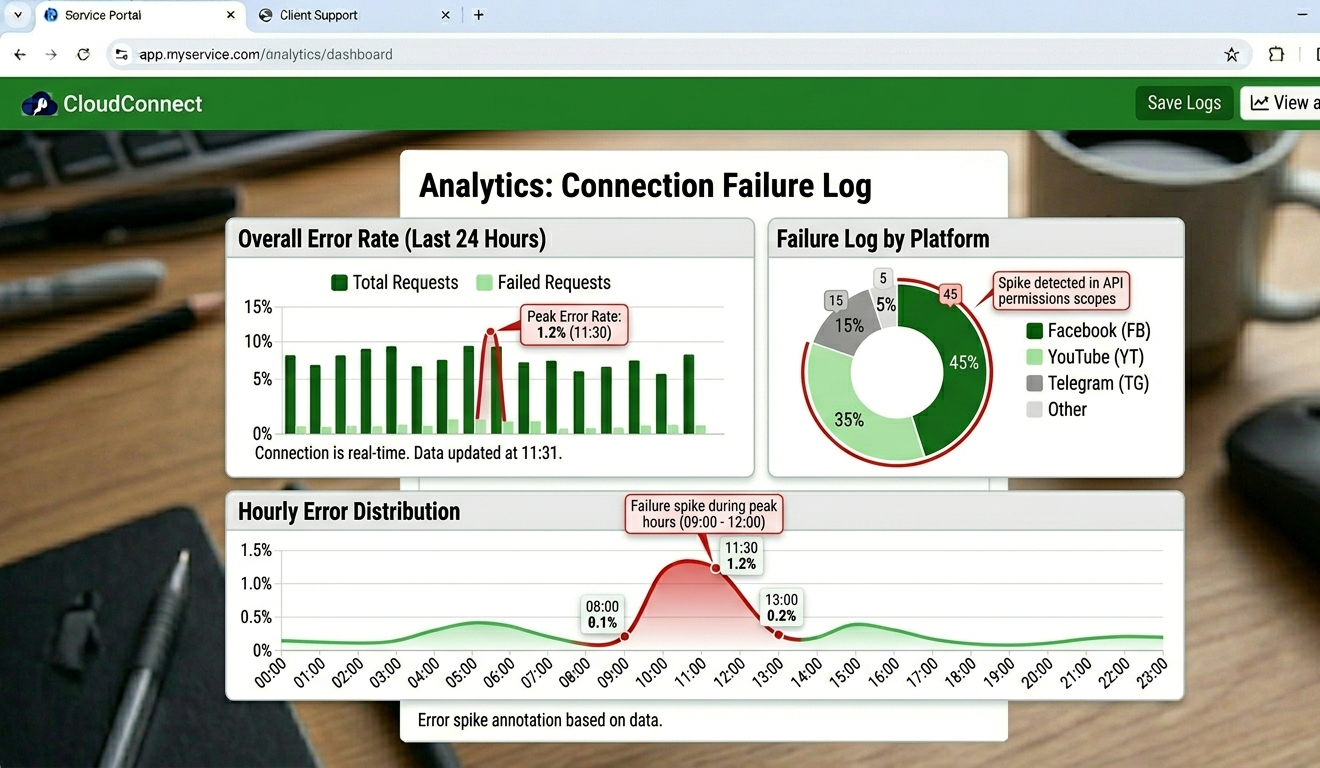
Connection failure log in analytics panel showing error rate spike during peak hours
Failure Pattern #2: Not Configuring the Panel Properly Before Launching
This shows up constantly with new resellers: they buy credits, create their first few accounts, and start selling, without configuring several critical settings in the management panel that determine service quality and business protection.
The specific settings that get missed most often:
Connection limits: if you don’t set a maximum connection count per account in the Connection Manager field, subscribers can share logins with unlimited devices. You’ll notice this in your analytics when one account shows 6 to 8 simultaneous connections. You’re funding other people’s streaming without being paid for it.
Buffer control: this setting is in Stream Settings under Advanced Configuration, not in the main setup flow. If you skip it, streams will freeze under any server load spike. It was the source of the most support messages in the first weeks of operation for many resellers who didn’t know it existed. Enable it before activating your first user account.
Two-factor authentication on your admin account: not configured by default. It’s in Account Settings, not Security Settings, which is where you’d logically look. An unprotected admin account is a single point of failure for your entire subscriber base. Configure this on day one.
Renewal reminder schedule: the subscription management section needs to have reminder intervals configured. If these aren’t set up, expiry approaches without any automated notification to subscribers, and you end up chasing renewals manually or losing them entirely.
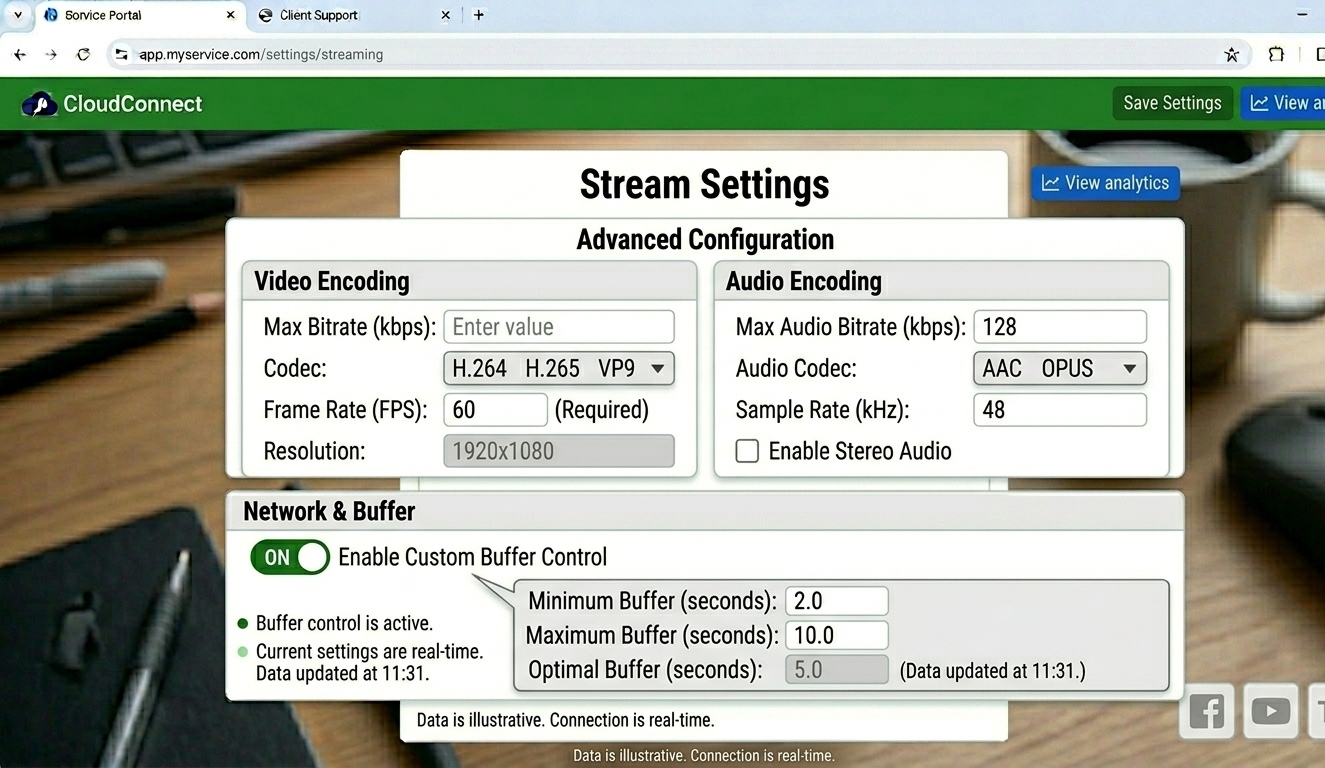
Stream Settings panel showing Advanced Configuration section with buffer control toggle
Taking about 20 minutes to work through the full panel configuration before activating any accounts prevents the majority of avoidable first-month problems.
Failure Pattern #3: Poor Customer Support Infrastructure
Support failures are the leading cause of churn among subscribers who have actually been satisfied with the service quality. Someone can be happy with what they’re paying for, have a single unresolved technical issue, and leave forever because you took 48 hours to respond.
The streaming market has conditioned users to expect fast support. When something stops working, they want help now, not tomorrow, not in 24 hours.
The operational reality is that you can’t personally respond to every message within an hour, especially if you’re managing a IPTV Panel reseller operation alongside other commitments. The solution isn’t to work longer hours. It’s to reduce the volume of support messages through prevention, and to handle the remainder systematically.
Prevention: a comprehensive setup guide sent with every set of credentials answers 80% of first-contact support questions before they’re asked. Cover the four most common device types (Firestick, Smart TV, iOS, Android), include screenshots, and address the most common errors explicitly. This document takes a few hours to produce and saves dozens of hours in support over the following months.
Systematic handling: use the CRM functionality in your panel to track every support interaction per account. When a subscriber contacts you, you can immediately see their subscription history, connection logs, device type, and any previous issues. This context cuts diagnosis time dramatically and makes your support feel far more professional than it would otherwise.
Proactive outreach: the analytics panel shows connection failure logs and accounts with unusual error patterns. Contacting subscribers before they contact you, “we noticed some connection issues on your account, here’s the fix”, is far more effective for retention than reactive support. It happens maybe twice a week and takes ten minutes. The goodwill it generates is disproportionate.
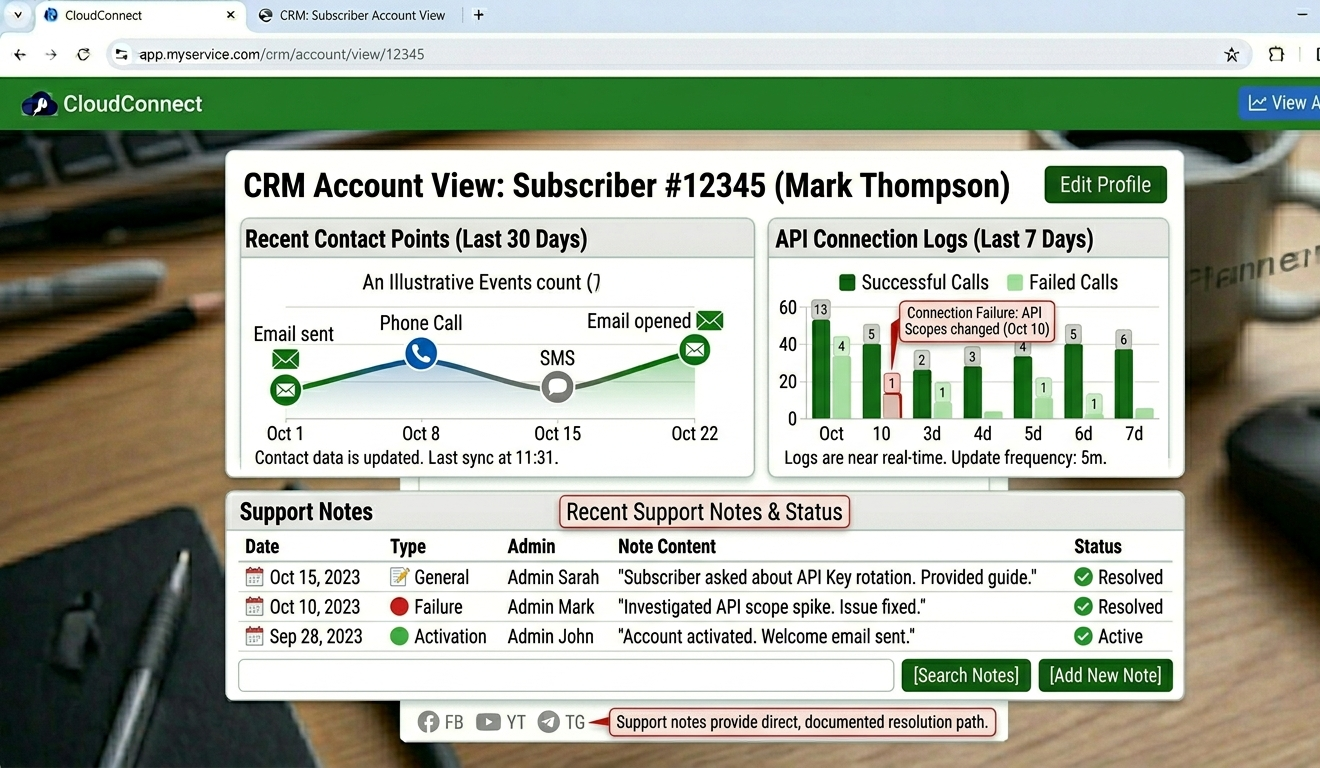
CRM account view showing subscriber contact history, connection logs, and support notes panel
Failure Pattern #4: Credit Mismanagement
Running out of credits is a purely operational failure. It’s entirely preventable and it’s not uncommon. Resellers who are growing quickly sometimes find themselves in a situation where demand exceeds their credit buffer, and they can’t activate new accounts until a top-up is processed.
The timing is usually the worst possible: a Saturday afternoon before a major match, a busy holiday weekend. New subscribers who’ve paid are waiting. Existing renewals are queued. Every hour of delay creates frustration and, in some cases, chargebacks.
The discipline is simple: check your credit balance every Monday morning. Keep a buffer equal to at least two weeks of your typical activation volume. Never let the balance fall below that floor without immediately initiating a top-up.
The panel doesn’t send low-balance alerts by default. This is a genuine gap in the default configuration. Set a calendar reminder until the habit is automatic.
A secondary credit management issue: over-purchasing from unproven suppliers. New resellers sometimes buy large credit batches at bulk discount prices from a supplier before establishing a reliable Iptv service track record. If the supplier turns out to be poor quality and you need to switch, those credits typically don’t transfer. Start with smaller purchases until you’ve verified supplier quality over four to six weeks.
Failure Pattern #5: Treating Every Subscriber the Same
Not all subscribers are equal in business terms, and treating them all identically is a passive way to underinvest in your highest-value clients and overinvest in marginal ones.
High-value subscribers are on annual plans, rarely contact support, refer other clients, and renew without prompting. Marginal subscribers are on monthly plans, generate disproportionate support volume relative to their revenue, and churn unpredictably.
The analytics section in your panel shows you exactly who is who. Connection frequency, plan type, renewal history, support contact rate, this data tells you where to focus your attention and what your next marketing emphasis should be.
Practically, this means:
- Annual plan subscribers get proactive renewal contact with a personal message five to seven days before expiry
- High-contact subscribers get reviewed to understand whether their issues are service quality or setup complexity, fixing the root cause reduces support volume
- Monthly plan subscribers at renewal get an upsell message about annual plan value before a standard renewal prompt
None of this is complicated. It just requires building the habit of reviewing your subscriber analytics weekly rather than only when something goes wrong.
Failure Pattern #6: Ignoring Legal Clarity and Transparency
This failure pattern is different in character from the others. It’s slower moving but potentially more serious in consequence.
Operating any subscription service without clear terms creates legal and reputational risk. In the UK and EU particularly, consumer protection laws require clear disclosure of subscription terms, cancellation policies, and data handling practices. In the USA, similar requirements apply at state level in several jurisdictions.
The reseller platform provides subscription management tools, it does not host or distribute content. That distinction is important and should be clearly stated in your terms of service. What you’re selling is subscription access management. Being clear about this isn’t just a legal protection, it’s honest, and sophisticated buyers in the UK/USA/EU markets appreciate it.
Practical steps:
- Have clear, readable terms of service on your website
- State explicitly what your service provides and what it doesn’t
- Maintain a clear cancellation and refund policy
- Keep subscriber data in compliance with applicable privacy law (GDPR for EU/UK subscribers, CCPA for California subscribers)
None of this requires a lawyer to implement at a basic level. It does require taking an hour to think through and document your policies clearly before you start marketing.
What Most Reseller Guides Don’t Tell You
The First Month Is Almost Always Harder Than Expected
The learning curve in the first 30 days involves simultaneously learning the panel interface, establishing a supplier relationship, setting up your support infrastructure, creating setup documentation, and managing your first subscribers’ onboarding. Most guides make this sound sequential and orderly. In practice, it all happens at once and usually while you’re also working out configuration issues.
Build your expected timeline around this reality. Don’t set income expectations for month one that require everything to go perfectly. The resellers who survive month one and build sustainable operations are usually the ones who expected the learning curve and didn’t interpret early friction as evidence that the business model doesn’t work.
Refund Requests Are a Signal, Not Just a Problem
Every refund request contains diagnostic information. A refund because “the streams keep buffering” points to supplier quality, it was too complicated to set up” points to your onboarding documentation,I expected different channels” points to a marketing-to-service alignment problem.
Track refund reasons explicitly. After ten refund requests, patterns become clear that tell you exactly where to improve, and improving those specific things prevents the next ten.
Your Renewal Rate Is More Important Than Your New Subscriber Rate
A 90% monthly renewal rate on 100 subscribers generates 90 renewals per month while you’re adding new ones. A 70% renewal rate on 100 subscribers requires 30 new subscribers per month just to maintain the same base, before any growth. The acquisition cost of 30 new subscribers per month is substantial.
Every decision that improves renewal rate, better supplier quality, better onboarding, proactive support, has compounding value that new subscriber acquisition simply doesn’t have at the same investment level.
Real Setup Mistakes and What Fixed Them
Mistake 1: Activating accounts without testing connection limits. Outcome: Three accounts generating traffic consistent with 4 to 6 simultaneous connections each. Credits draining faster than subscriber count explained. Fix: Set connection limits at account creation without exception. Five seconds in the Connection Manager field prevents this entirely.
Mistake 2: Sending credentials without device-specific setup guides. Outcome: Three of first ten subscribers couldn’t complete setup independently. Two churned without ever using the service. Fix: Created setup guides for the four most common devices before sending credentials to anyone. Included screenshots for each step. First-contact support volume dropped significantly.
Mistake 3: Not monitoring the connection failure logs during the first month. Outcome: A specific sports bouquet had been failing intermittently for 12 days before a subscriber mentioned it in a support message. Fix: Daily two-minute check of the analytics failure logs. Anything above baseline failure rate gets investigated immediately.
Mistake 4: Offering refunds without understanding the reason first. Outcome: Gave refunds reactively without diagnosing the root cause. Same type of issue kept generating refund requests. Fix: Diagnostic conversation before any refund decision. Identify whether the issue is supplier quality, device configuration, or subscriber expectation mismatch. Fix the root cause, not just the individual case.
Mistake 5: Not scheduling regular supplier performance reviews. Outcome: Supplier quality gradually degraded over two months without noticing until churn rate increased significantly. Fix: Weekly analytics review specifically looking at connection error rate trends. A gradual increase over multiple weeks signals supplier degradation before it becomes a churn problem.
Account Management Workflow: Avoiding Operational Errors
Here’s a step-by-step of what a properly configured account activation actually looks like, along with the specific errors each stage prevents:
| Step | Action | Panel Location | Time | Common Error |
|---|---|---|---|---|
| 1 | Check credit balance | Credit balance widget | ~30 sec | Insufficient credits discovered after sale |
| 2 | Create account | User Management > Add User | ~60 sec | Connection limit left unconfigured |
| 3 | Test credentials | Personal test device | ~2 min | Skipped, client gets broken credentials |
| 4 | Configure renewal reminder | Subscription Settings | ~30 sec | Never set up, renewals missed |
| 5 | Send credentials + guide | Messaging / email | ~2 min | Guide not included, support call follows |
| 6 | Log account notes | CRM account field | ~1 min | No notes, support context lost later |
Total time for a complete, properly configured account activation: roughly 6 to 7 minutes. The extra minutes compared to rushing through creation prevent a disproportionate amount of downstream problems.
Panel Features That Prevent Specific Failures
Subscription Management
The User Management tab tracks every account’s lifecycle with expiry dates, active status, and connection history. The “expiring soon” filtered view shows accounts expiring in the next seven days. Checking this every Monday morning takes two minutes and completely eliminates the failure pattern of missed renewals.
Suspending before deleting is a rule worth making absolute: every account should be suspended rather than deleted as a first response to churn or inactivity. Deleted accounts are permanent and credits are not refunded. Suspended accounts can be reactivated if the subscriber returns. Given that IPTV subscribers often cycle back after cancelling, keeping account history is worth the minor overhead.
Analytics for Business Health Monitoring
The analytics section is underused by most operators. The data that matters most for preventing failure:
- Connection failure rate trend (week-over-week): rising failure rates predict churn before it happens
- Renewal rate by plan type: declining renewal rates on monthly plans signal a service quality or expectation problem
- Device type breakdown: tells you where to focus setup documentation effort
- Peak usage by hour: tells you when to be available for support and when to check service quality
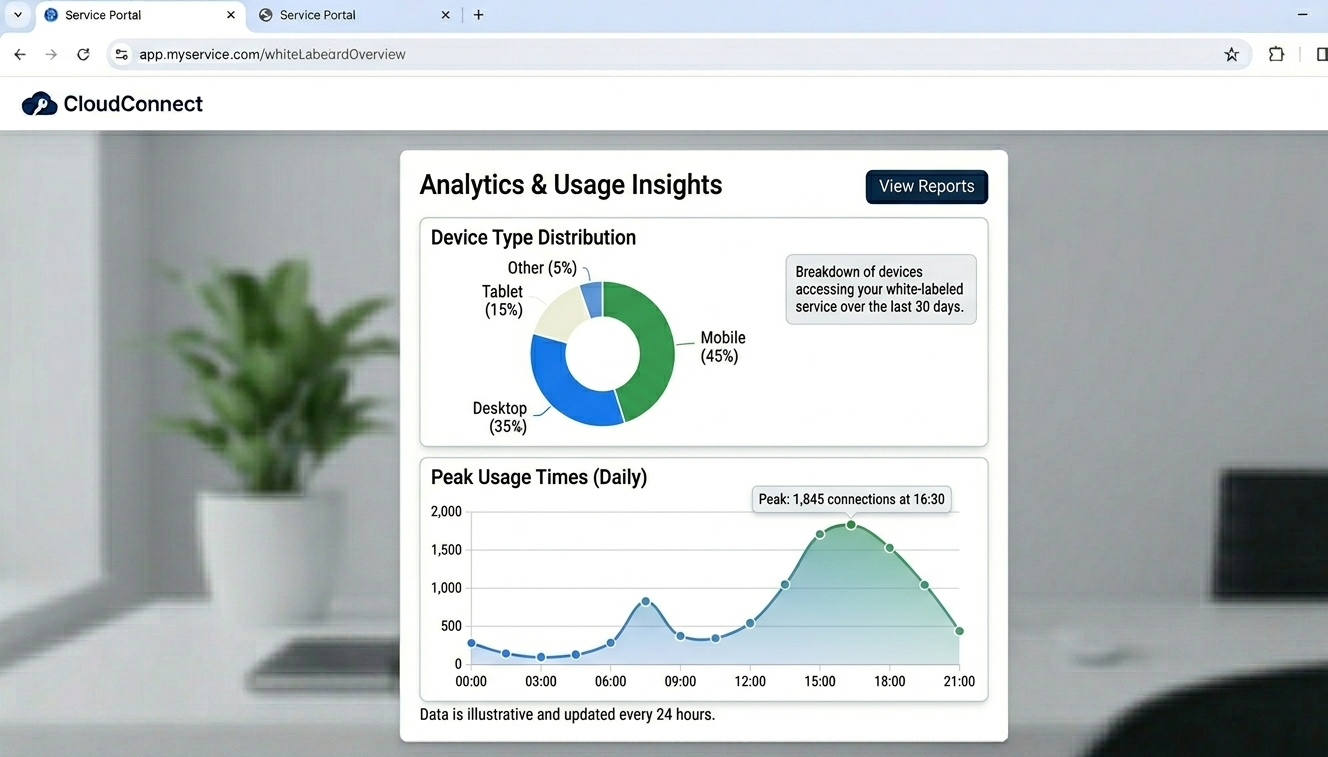
Analytics section showing device type breakdown chart and peak usage time data
The Billing System and Credit Management
Automated renewal reminders configured in Subscription Settings eliminate the most common revenue leak: subscribers who would have renewed with a reminder but churned because they forgot and had to go through the effort of signing up again.
Configure reminders at seven days and three days before expiry. Verify in Notifications Settings that email integration is active. Reminders that trigger internally but don’t send because email isn’t configured are a surprisingly common setup oversight.
Reseller Model vs. Own Infrastructure: The Risk Comparison
Before you commit either way, here’s a side-by-side of what you’re actually taking on with each model:
| Factor | Reseller Model | Proprietary Server |
|---|---|---|
| Setup Cost | Low | Very High |
| Technical Skill Required | Basic | Advanced |
| Content Licensing | Supplier’s responsibility | Entirely yours |
| Failure Risk | Supplier-dependent | Infrastructure-dependent |
| Maintenance | Provider handles | Constant |
| Scaling | Immediate | Hardware-constrained |
The content licensing point is the one with the most serious long-term implications. Building and operating streaming infrastructure means content distribution obligations are your legal responsibility. In the UK, USA, and EU, that’s a significant financial and legal exposure. The IPTV reseller model keeps that responsibility with the supplier. Your role is subscription management and client relationships.
Best Practices for Building a Sustainable Operation
Quality over volume, especially early. A small, satisfied subscriber base with high renewal rates is a better foundation than a large subscriber base with poor retention. The compounding value of high retention significantly outweighs the short-term revenue from rapid, low-quality growth.
Document your processes. Write down your setup workflow, your support response templates, your supplier review checklist, and your weekly operational tasks. Documented processes prevent errors and make the business much easier to manage consistently. If you ever bring in another person to help, documented processes are what make that scalable.
Audit your operation monthly. Review renewal rate, refund rate, support volume, and credit utilization. Each of these metrics tells you something specific about your operational health. Declining renewal rate points to service quality or expectation problems. Rising support volume points to product complexity or documentation gaps. Rising refund rate often points to supplier quality issues.
Build the backup supplier relationship before you need it. Maintain a tested and credited relationship with a secondary supplier from early in your operation. The cost is minimal, the risk mitigation during a primary supplier outage is significant.
FAQ
What’s the most common reason resellers fail in the first 90 days?
Poor supplier selection followed by poor support infrastructure. These two factors account for the majority of early failures. Cheap credits that buffer creates churn that’s impossible to recover from at small subscriber counts, and slow support during those early failures accelerates it.
How do I know if my supplier quality is actually good?
Track the connection failure rate in your analytics panel week over week. A stable, low failure rate (under 2 to 3% of connection attempts) indicates good quality. Rising failure rates over multiple weeks indicate degrading supplier performance. Test personally during peak hours every month regardless of what the metrics show.
What’s the right renewal rate to aim for?
Above 85% monthly is healthy. Above 90% is excellent. Below 80% indicates a problem that needs diagnosing, usually either service quality, onboarding experience, or subscriber expectation mismatch from marketing. Calculate it monthly: renewals completed divided by renewals due.
Should I offer refunds?
Having a clear, fair refund policy is better than deciding case-by-case. Most operations offer a short satisfaction period (24 to 48 hours) during which a full refund is available. After that, partial or no refund depending on your terms. Communicate this clearly on your pricing page before anyone buys.
How do I handle a supplier outage when clients are affected?
Communicate immediately and proactively. A brief message acknowledging the issue and providing an estimated resolution window prevents frustration from escalating into churn. Use the connection failure logs to identify affected accounts and reach out directly to subscribers likely to be experiencing the issue. Proactive communication during outages is the single most effective retention tool during service disruptions.
When should I upgrade from a basic to an advanced panel?
When you’re consistently managing 80 to 100+ active subscribers, or when you’re ready to build a sub-reseller network. The advanced tier’s real-time analytics and API access become genuinely useful at that scale. Below 50 subscribers, the basic panel handles everything you need.
How do I prevent account sharing from draining my credits?
Set connection limits on every account at creation, every single time. Check the Connection Manager field before clicking Create. A single-connection plan gets capped at 1, a dual-connection plan at 2. The analytics active connections view will flag any accounts generating unusually high simultaneous connections if something slips through.
The IPTV resellers who build sustainable operations aren’t necessarily the ones with the best marketing or the most aggressive pricing. They’re the ones who do the operational fundamentals well consistently: solid supplier, properly configured panel, good support documentation, weekly analytics review, and honest client communication. None of these are complicated. They just require doing them every week rather than occasionally, and treating the operation like a business that needs maintenance rather than a passive income source that runs itself.