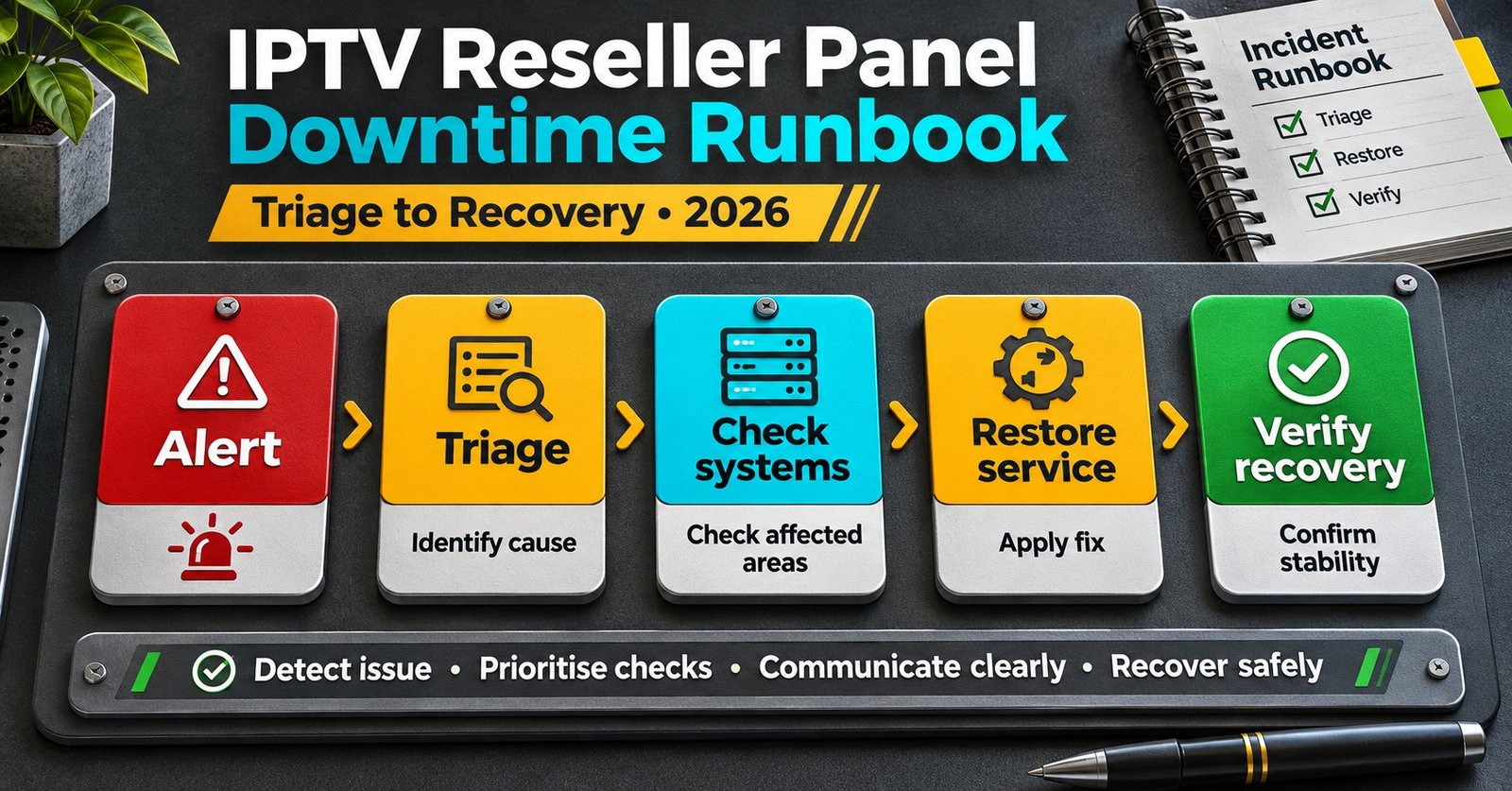

An IPTV Reseller Panel Downtime Runbook is a short set of steps you agree in advance and follow the moment your dashboard stops responding. Confirm the fault from a second connection. Work out whether subscribers can’t watch or only your admin access has failed. Give it a severity level, pause anything that spends credits, and send a first update before the support inbox fills up. If you do only one thing in the first five minutes, test a known working subscriber line yourself. Whether it plays or not decides almost everything that follows.
The panel and the service often fail separately. The dashboard where you create lines and top up credits usually runs on different infrastructure from the servers that deliver streams. So a frozen login page can sit alongside thousands of subscribers watching normally, and a healthy-looking dashboard can hide a delivery fault that’s about to generate a hundred messages. Get that judgement wrong and your messages go wrong too. Tell happy customers there’s a problem and you create worry. Tell struggling customers to restart their devices and you waste their evening.
Two Failures That Look Identical From Your Desk
When something breaks, you’re nearly always looking at one of three situations. Naming them in your runbook stops you treating them as one vague “outage”.
The panel is down, the service is fine
The admin side won’t load or keeps throwing errors. You might see login loops, a blank credits page, or a server error every time you try to create or extend a line. Existing subscribers carry on watching without noticing anything. The damage is operational: you can’t sell, renew, reset or fix accounts until the panel comes back. Customers only feel it if their renewal falls due during the gap.
The service is down, the panel is fine
You log in normally, but subscribers report constant buffering, rejected logins in their player apps, or empty channel lists. This is the version that floods your inbox. It also misleads people, because a working dashboard makes the problem look like it’s on the customer’s end.
Partial or patchy faults
The fault only hits some regions, some device types, or one server address. These are the hardest to spot, because at first they look like ordinary individual tickets. Watch for three or four similar complaints arriving close together from customers who have nothing in common. That’s your signal to stop answering them one at a time and start the runbook.
The First Fifteen Minutes: A Triage Pass
The order matters, because each step narrows down the next. Write these into your runbook in this sequence and resist the urge to skip ahead.
- Check from a different connection. Use mobile data on your phone rather than the same Wi-Fi. Many apparent outages turn out to be local: an expired session, a browser extension, a router DNS problem, or your own IP address being temporarily blocked after repeated login attempts.
- Play a test line yourself. Keep one subscriber account for your own testing, set up on a spare device. If it plays normally, the delivery side is probably up and you’re dealing with a panel problem.
- Check your provider’s announcement channel. Upstream suppliers usually post known issues in a group or status page. If they’ve already acknowledged it, you can skip straight to communication.
- Look for a pattern in incoming tickets. Same app, same device family, same region, or the same start time all point somewhere different.
- Write down the start time and what you’ve seen. Two lines in a shared note is enough. This becomes your timeline for escalation and the review afterwards.
- Assign a severity level and one owner. Even in a one-person business, write down that you own it. In a team, this stops two people sending contradictory messages.
- Freeze actions that spend credits (covered below).
- Send the first acknowledgement if the severity level calls for one.
Pro tip: Keep the provider’s announcement channel, your test line login and this runbook together in one pinned note. That way the first three steps take a couple of minutes instead of a search through old messages.
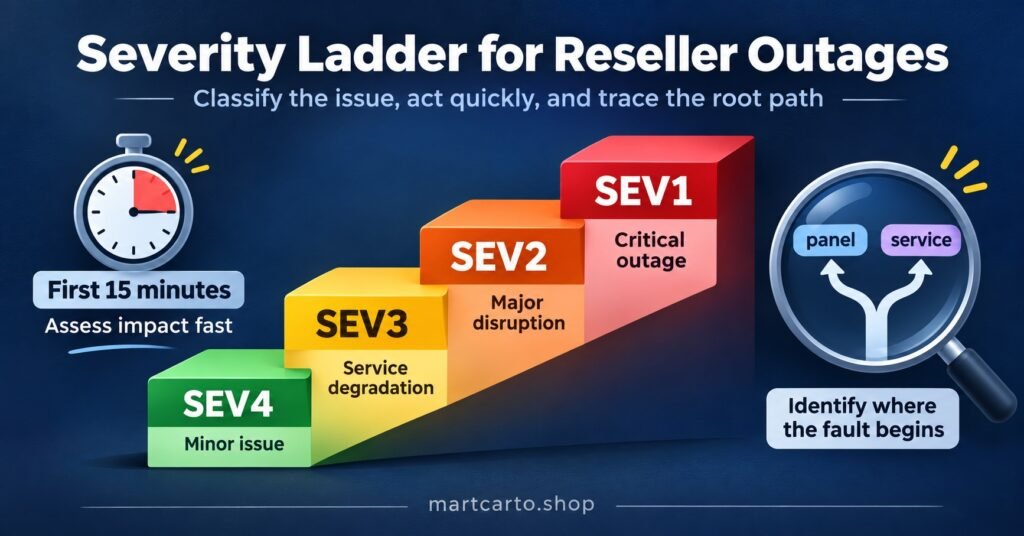
The Severity Matrix in an IPTV Reseller Panel Downtime Runbook
Severity levels exist so you’re not deciding how serious something is from scratch while messages pile up. The thresholds are yours to set. The matrix below is a starting point to adjust for the size of your customer base and how many sub-resellers depend on you.
| Level | What it looks like | First response |
|---|---|---|
| SEV1 Critical | Streams failing for most or all subscribers, or the panel and service both down | One owner immediately, public acknowledgement quickly, provider escalation, updates at a fixed interval |
| SEV2 Major | A large group affected (one server, one device family, one region), or the panel fully unavailable while renewals are due | Message the affected group, escalate upstream, pause renewals and new lines |
| SEV3 Minor | Panel slow or one function broken (search, credit history, bulk tools), service unaffected | Internal note, use a workaround, no public message unless customers ask |
| SEV4 Low | A single customer, a display glitch, or a fault you can’t reproduce | Normal ticket handling |
A level isn’t fixed once you’ve set it. Move an incident up when the number of affected customers grows, when your provider confirms a wider fault, or when time turns a small problem into a large one. Move it down once your test line and a few affected customers confirm things are recovering. Hold the all-clear until you’ve done the recovery checks further on.
Time is the factor people miss. Here’s a hypothetical: the panel goes down at 23:30 on the last evening of the month, and a large batch of lines expires at midnight. On paper it’s a panel-only fault, so SEV3. In practice, those expiries happen whether the panel is up or not. You’ll soon have customers who’ve paid but been cut off, which is SEV2 at least. Your matrix should include a line that says something like “panel-only faults move up a level when renewals are due within the next few hours”.
For SEV1 and SEV2, pick an update interval you can actually keep, for example every 30 minutes, and keep to it even when there’s nothing new to say. Silence does more damage than a “no change yet” message.
What to Pause While the Panel Is Unstable
An unstable panel is riskier than a dead one. A dead panel rejects everything. An unstable one can accept a request, deduct credits, and then show you an error, so it looks like nothing happened. If you try again, you can end up paying twice for one line.
Pause these until the panel has been stable for a while:
- Creating new lines and trials, which can leave half-built accounts with credits already taken
- Renewals and extensions, where retrying can double the deduction
- Credit transfers to sub-resellers
- Bulk edits, package changes and moving lines between groups
- Password resets and device or MAC address changes
If someone did attempt any of these during the incident, write down the account, the action and the time. You’ll need that list later to check what actually happened.
Decide in advance how you’ll handle subscriptions that expire during the outage, rather than improvising per customer. A common approach is to process those renewals first once the panel is back, sometimes with a short goodwill extension where your provider and your credit balance allow it. Don’t promise free days in a message before you know you can issue them.
Communication Scripts You Can Adapt
Every good outage message does three things. It says what you know, admits what you don’t, and tells people when they’ll hear from you next. Leave out guesses about the cause, don’t blame suppliers in public, and don’t ask customers to reinstall apps unless your triage actually points to a device problem. Replace the bracketed parts and keep the tone plain.
First acknowledgement (SEV1 or SEV2, service affected)
Hi everyone. We know some customers have had trouble with [playback / logging in / loading channels] since around [time]. We’re looking into it with our technical partner now. You don’t need to change any settings or reinstall your app. Next update by [time].
Follow-up when there’s no fix yet
Update at [time]: we’re still working on this. What we know so far: [one plain sentence]. We’ll post again by [time]. If your subscription is due to renew while this is going on, please don’t pay again. We’ll sort out all renewals once everything is stable.
Panel-only outage, replying to a customer who wants to renew
Thanks for getting in touch. Our account system is temporarily unavailable, so we can’t process renewals or changes for a short while. Your current service isn’t affected. We’ve noted your request and your expiry date, and we’ll process it as soon as the system is back. You won’t need to send payment again.
Device or region-specific fault
We’re seeing reports from customers using [device type or app]. Other devices are working normally. If you have a second device, you can use it in the meantime. We’re working on a fix and will update you by [time].
Notice to sub-resellers
Heads-up for panel resellers: there’s a [panel / service] issue since [time], currently severity [level]. Please pause new lines, renewals and credit transfers until we confirm it’s resolved. You’re welcome to use the customer message below with your own subscribers. Please don’t promise compensation or timescales beyond what’s in it. If any of your customers renew or pay during this window, keep a note and send us the list.
Holding reply for the support inbox
Thanks, we know about this and we’re working on it. Live updates are here: [link]. You don’t need to send another message unless the problem continues after we’ve confirmed it’s fixed.
All clear
Resolved at [time]: everything is working normally again. If you’re still having trouble, please close and reopen your app once, then reply with your username so we can check your account directly. Thanks for bearing with us.
Post updates where your customers already look, and pin the latest one to the top. If customers mostly reach you through one messaging channel, a polished update on a status page they’ve never visited won’t help anyone.

Escalating Upstream With Evidence, Not Just Urgency
Your provider’s support team is probably getting the same complaint from lots of IPTV panel resellers at once. One structured message with useful detail gets dealt with faster than ten messages asking whether it’s down.
Include:
- The start time, with your time zone
- Whether it’s the panel, the service, or both
- Your test line result, and the device and app you tested on
- Two or three example usernames that are affected (never passwords)
- Any error messages, word for word, or screenshots
- Anything you changed recently, such as new lines, bulk edits or DNS settings
Then ask two things: what else they need from you, and when they’ll next update you. Write their answer into your timeline.
A runbook makes you faster and more consistent, but it can’t fix a supplier problem. If outages are frequent, unexplained, or followed by silence, that’s a reason to review your supplier, not just tweak the runbook. Having a professional dashboard doesn’t prove a supplier holds the distribution rights to its content. Asking a provider to explain both its reliability and its licensing is a normal part of choosing who to resell for.
Recovery Checks Before You Announce a Fix
Things often look fixed before they are. Run these checks before you send the all-clear:
- Your test line plays on two different device types, not just the one you always use.
- Two or three customers who reported the problem confirm it’s working for them.
- Your credit balance matches the last figure you noted before the incident, after allowing for actions you know went through.
- Every action on your incident list has been checked. Look for duplicate lines, double extensions, or accounts that were created without a matching deduction.
- Queued renewals are processed in order of expiry, earliest first.
- Things stay stable for a short while before you announce it. Faults that come back within minutes are common enough that one premature all-clear can cost you more trust than the outage did.
A Short Review While It’s Still Fresh
Once it’s settled, spend ten minutes writing it up. Record when it started and ended, whether you or your customers spotted it first, the severity level and whether it changed, what slowed you down, which messages went out, any credit discrepancies, and one change to make to the runbook.
Keep it to a page. A single review rarely tells you much. Six months of them tell you a lot: whether faults cluster around particular times, whether your provider communicates well, and whether you need a second test device, a backup channel for customer updates, or a different supplier altogether.
The pinned version
When your team needs the whole thing on one screen, this is what goes at the top of the runbook:
- Check from mobile data, then play the test line
- Check the provider’s announcement channel
- Classify it: panel only, service only, or partial
- Set a severity level and name one owner
- Freeze new lines, renewals, transfers and bulk edits
- Send the matching script and set the next update time
- Escalate upstream with times, usernames and errors
- Run every recovery check before announcing the fix
- Write the one-page review the same day
Questions Resellers Ask About Outage Handling
Should I tell customers about a panel outage they haven’t noticed?
Usually not. If streams are working, a public notice mostly causes worry. The exception is customers whose renewal falls due during the outage. Contact them directly so they don’t pay twice or think they’ve been forgotten.
What happens if a customer’s subscription expires while the panel is down?
The line will usually expire on schedule, because expiry is handled on the service side, not by you logging in. That’s why your runbook should process those renewals first once you’re back in, and why the renewal script tells customers not to send payment again.
How often should I update customers during a major outage?
Choose an interval you can genuinely keep and stick to it. A short “no change yet, next update by [time]” message is better than going quiet, because silence is what makes people message you individually.
Do sub-resellers need their own runbook?
They should use the same severity levels and pause rules, so that everyone’s actions match. Upstream escalation and public statements about the cause should stay with the parent reseller, though. Otherwise customers end up getting different stories from different sellers.
When does repeated downtime mean it’s time to change provider?
Your review log answers this better than gut feeling. Look at how often it happens, how long recovery takes, how quickly the provider acknowledges problems, and whether they answer evidence-based escalations properly. A supplier who communicates well during occasional outages is often easier to work with than one with fewer outages and no communication at all.
Putting Your Runbook to Work
A useful IPTV Reseller Panel Downtime Runbook isn’t long. It’s a triage order, a severity matrix with your own thresholds, a list of actions to freeze, and messages you’d be comfortable sending at midnight without editing. It won’t stop outages, and it won’t make up for an unreliable or unlicensed supplier. What it will do is cut the gap between “something’s wrong” and “customers know what’s happening”, which is where most of the damage to trust happens.
The best next step is a dry run. Pick a quiet afternoon, pretend the panel has just gone down, and walk through every step with your team, test line and scripts included. Whatever slows you down is the first thing to fix. If you’re still setting up how your lines, credits and sub-reseller accounts are organised, start from the martcarto.shop IPTV subscription reseller platform and build the runbook around how your account actually works.