
Who Actually Needs Arabic IPTV and Why
The Arabic-speaking diaspora in Western countries is substantial. There are an estimated 1.5 million Arabic speakers in the UK, over 3.5 million in the US, and significant communities across France, Germany, the Netherlands, and Scandinavia. For these communities, Arabic-language television isn’t an optional extra, it’s how they follow home news, stay connected to culture, maintain language for their children, and watch the sports that matter to them.
The problem is that traditional solutions are either expensive (dedicated satellite subscriptions with specific dish requirements), geo-restricted (most Arab-world streaming apps block international access), or unreliable (unverified services with inconsistent quality).
A properly configured Arabic IPTV subscription addresses all three. This guide covers what genuine Arabic coverage looks like, how to evaluate providers for this market, and how the management infrastructure behind these services works.
What Arabic-Speaking Subscribers Actually Watch
Understanding channel priorities before configuring any Arabic IPTV package saves significant troubleshooting time later.
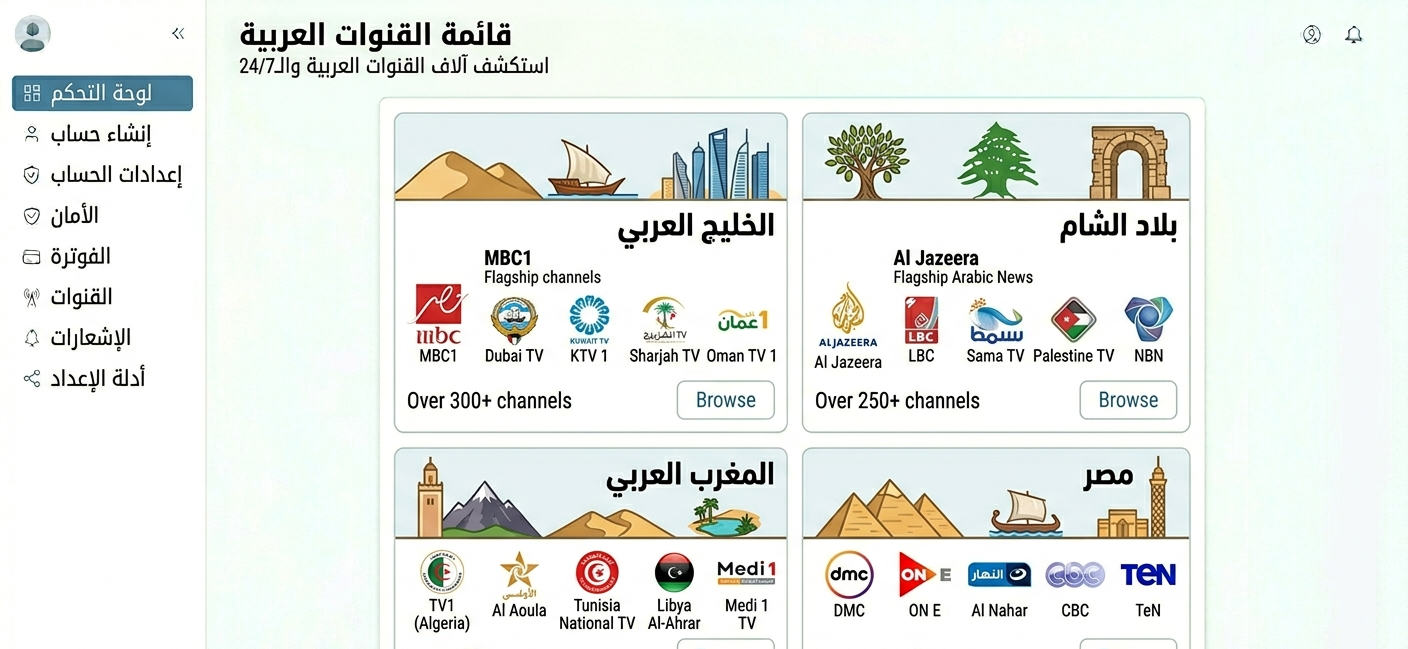
News channels see the highest demand, including Al Jazeera Arabic (Doha, Gulf-focused international news), Al Arabiya (Saudi-funded, pan-Arab news), Al Mayadeen (Lebanon-based, widely followed), MBC Masr (Egyptian news and entertainment), and Sky News Arabia.
General entertainment and drama includes MBC1, MBC2, MBC3 (Saudi-owned pan-Arab broadcaster, huge audience), Rotana Cinema and Rotana Khalijiya (Arab cinema, music), LBC (Lebanese Broadcasting Corporation), and Abu Dhabi TV and Dubai TV (UAE national channels).
Sports is increasingly important, with beIN Sports Arabia (holds rights to major football leagues including La Liga, Ligue 1, and most recently expanded UCL coverage), SSC Sport (Saudi Sports Company, holds Saudi Pro League rights), and Abu Dhabi Sports.
Regional and country-specific channels matter too. Egyptian channels (CBC, ON, Extra News) serve the largest Arabic-speaking group in the UK. Moroccan channels (2M, Al Aoula) serve a significant French Moroccan community. Iraqi and Syrian channels serve growing diaspora populations across Europe.
This isn’t exhaustive, but it illustrates why “Arabic channels” as a generic category isn’t enough information. An Egyptian subscriber and a Gulf Emirati subscriber have almost entirely different channel priorities.
Verifying Arabic Coverage Before Selling It
Most providers offering “Arabic IPTV” have widely varying actual coverage. Here’s a practical verification process.
Start by checking Al Jazeera Arabic specifically. It’s the single most-watched Arabic news channel globally among diaspora populations. If Al Jazeera is absent or unreliable, the package has a serious gap.
Load MBC1 during prime time next. MBC prime time (7pm to 11pm Gulf time, which is 4pm to 8pm UK time) is when viewership peaks. A provider that streams MBC cleanly at 2am may struggle during actual peak hours, so test during those windows.
Test beIN Sports during a live match too. Arabic sports viewing is dominated by beIN Sports. If the sports channels don’t work during a live match, the sports offering is effectively non-functional regardless of what the channel list says.
Check Arabic EPG accuracy as well. EPG data for Arabic channels is notoriously variable. Some providers have excellent Arabic programme guide data, others have completely empty guides on Arabic channels. For viewers who rely on the guide to find specific programmes, this matters.
Finally, verify regional channels for your specific client base. If you’re serving Egyptian clients, verify Egyptian channels specifically. If you’re serving Moroccan clients in France, verify Moroccan channels. Generic Arabic packages often have strong Gulf coverage and weak Maghreb coverage.
Configuring Arabic Client Accounts in the Dashboard
Arabic-market account configuration has a few specifics worth noting.
Step one is logging into the dashboard. Navigate to the User Management tab. Standard login process.
Step two is selecting an Arabic-specific package if available. If your upstream provider offers region-specific packages, Gulf Arabic, Egyptian, Pan-Arab, North African, select the package that matches your client’s actual viewing preferences. A pan-Arab package is appropriate for most clients, while region-specific packages work better for clients with specific country preferences.
Step three is considering time zone configuration. Arabic-speaking clients in the UK are watching content that originates primarily in Gulf Standard Time (UTC+3) or Egypt Standard Time (UTC+2). MBC prime time at 9pm Gulf time is 6pm UK time, a manageable viewing window. But Al Jazeera’s live news coverage and major football matches on beIN Sports run at times that need to be correctly reflected in the EPG. Configure the account time zone to match your client’s geographic location (UK, EU, US), and verify the EPG reflects actual UK/EU/US viewing times rather than Gulf times.
Step four covers right-to-left and language settings. Some IPTV apps handle Arabic channel names and EPG data in right-to-left format correctly, others don’t. Test how the app renders Arabic text before recommending it to Arabic-speaking clients. TiviMate handles Arabic text reasonably well in current versions. IPTV Smarters Pro also renders Arabic EPG data acceptably. Older app versions sometimes render Arabic names as garbled characters.
Step five is connection configuration. Standard household connection recommendations apply. Arabic family viewing tends to be communal, a family gathering to watch an Egyptian drama series or a Gulf news programme is typical. Two concurrent connections serves most household scenarios adequately.
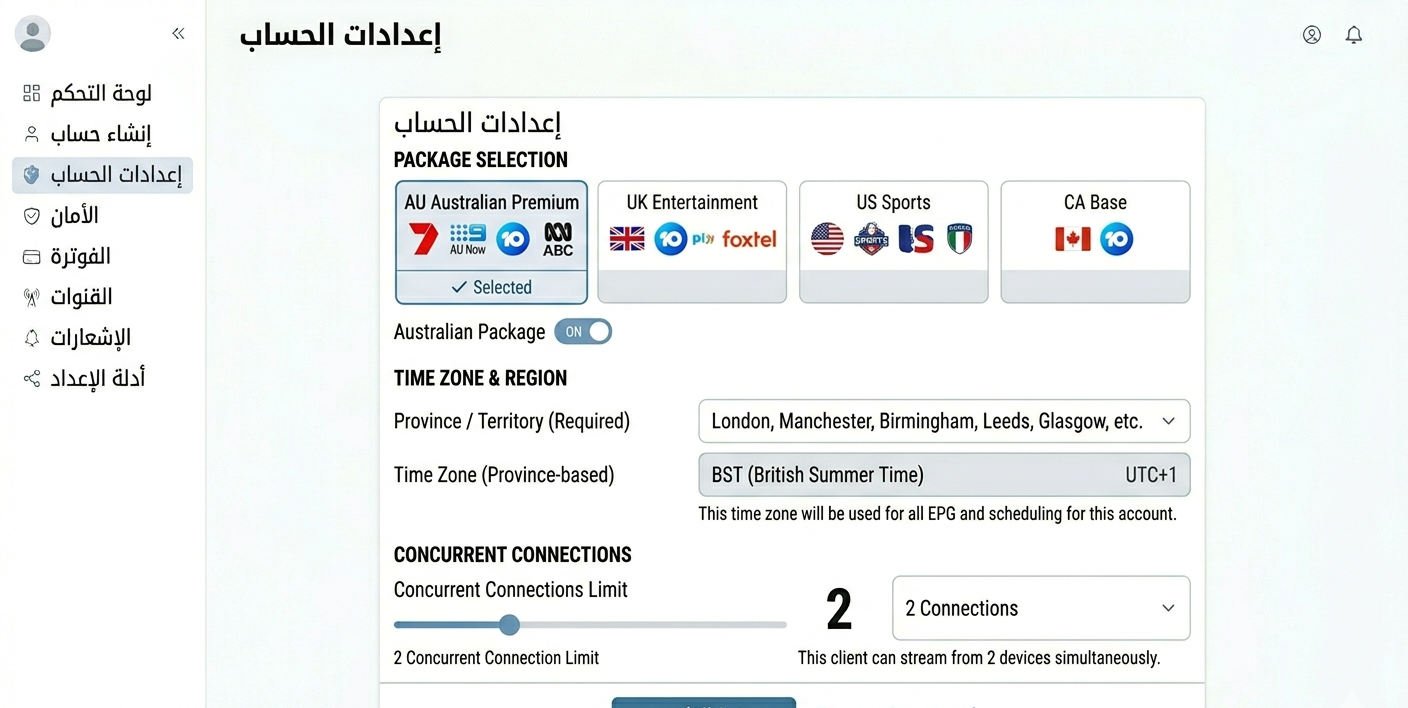
Account settings showing Arabic package selection with time zone configuration for UK-based Arabic viewer
Here’s the full account creation workflow laid out step by step:
| Step | Action | Where | Arabic-specific notes |
|---|---|---|---|
| 1 | Log into panel | Main login | Standard |
| 2 | Open User Manager | User Management tab | Standard |
| 3 | Create account | Add New User | Standard |
| 4 | Select Arabic package | Plan dropdown | Match to client’s regional preference |
| 5 | Configure time zone | Account settings | Client’s location, not Gulf time |
| 6 | Set connection limit | Subscription Settings | 2+ for family viewing |
| 7 | Deduct credits | Credit system | Standard |
| 8 | Generate credentials | Cloud system | Test Arabic channel load before delivery |
| 9 | Deliver with app guide | Encrypted message | Note Arabic text rendering in app |
Real Mistakes Made With Arabic IPTV Clients
One common mistake is assuming all Arabic clients want the same package. Early on, all Arabic-speaking clients were set up with the same “Arabic package.” An Iraqi client in Birmingham wanted specific Iraqi channels, Al Iraqiya, Al Rasheed, Al Anwar. A Moroccan client in Paris wanted 2M and Al Aoula. Neither was well-served by a Gulf-focused pan-Arab package. Now the first question to any Arabic-speaking client should be where they’re originally from and which specific channels matter most to them.
Another mistake is not testing beIN Sports during a live match. A provider’s beIN Sports channel was verified present and loaded on a quiet Tuesday afternoon, and several packages were sold to clients who followed football. The first big weekend of La Liga, beIN Sports buffered constantly, the server was overwhelmed by simultaneous peak connections, requiring a scramble to find an alternative provider. Test sports channels specifically during live broadcasts, not during off-peak hours.
A third mistake is ignoring EPG for Arabic channels. A client complained that the programme guide showed English descriptions for Arabic channels, or blank entries with just channel numbers. They used the EPG heavily to find specific shows and couldn’t navigate effectively. The provider’s EPG had excellent English channel data and essentially nothing for Arabic channels. Switching to a provider with genuine Arabic EPG data made a significant difference in usability.
A fourth mistake is not asking about children’s Arabic content. Several Arabic-speaking clients specifically wanted Arabic children’s channels for their kids, MBC3 (children-focused), Spacetoon, Cartoon Network Arabic. Packages were configured without checking whether these channels were included. For clients with young children, the absence of Arabic children’s content is a major problem that generates support calls and cancellations. Now it’s worth asking about household composition during onboarding.
A fifth mistake is underestimating Ramadan’s impact on viewing patterns. During Ramadan, Arabic-language viewership spikes dramatically. The major Arabic drama series that air during Ramadan, some of the most-watched television in the Arab world, generate server load that’s significantly higher than normal. A provider that handles regular viewership well may struggle during Ramadan broadcast windows. Plan for this if you have significant Arabic client numbers.
What Most Arabic IPTV Guides Don’t Cover
The Gulf/Levant/Maghreb distinction matters enormously. Arabic is spoken across 22 countries with significantly different media landscapes. The Gulf Arabic market (Saudi Arabia, UAE, Kuwait, Qatar) watches different content from the Levant Arabic market (Lebanon, Syria, Jordan), which watches different content from North Africa (Egypt, Morocco, Tunisia, Algeria). A service optimised for Gulf viewers will underserve Moroccan clients.
beIN Sports is the single most important sports channel. In the Arabic-speaking world, beIN Sports holds rights to more premium football leagues than any other broadcaster. Clients who follow La Liga, Serie A, Ligue 1, or the major UEFA competitions are watching beIN Sports. If beIN Sports quality is poor, sports-watching clients will leave regardless of how good everything else is.
Ramadan is a genuine business event, not just a cultural note. The month of Ramadan sees dramatic increases in Arabic media consumption. Prime-time Ramadan drama series are the highest-watched content of the year for many Arabic viewers. Your upstream provider needs to be able to handle this load. Find out in advance whether their infrastructure has been stress-tested during Ramadan.
Arabic VOD is underserved compared to live TV. Most Arabic IPTV packages have good live channel coverage and weak VOD. Arabic films, classic Egyptian cinema, and drama series libraries are often limited or unreliable. If your clients specifically want on-demand Arabic content, verify the VOD section specifically, don’t assume it’s comparable to the live channel quality.
Who This Is NOT Right For
Clients who primarily want Arabic content through official apps aren’t a good fit. Shahid (MBC’s streaming service), Starzplay Arabia, and similar official services are available in some Western markets with geo-restrictions. Clients who already have access to official services and want on-demand content with good curation might be better served by those than by an IPTV subscription with inconsistent VOD.
Clients with limited technical comfort and no local support need extra consideration. Arabic-speaking clients who are less technically comfortable than average may need more setup support than a typical subscriber. Setting up an IPTV app with Arabic text rendering correctly, configuring EPG, and understanding connection limits requires guidance. If you can’t provide support in Arabic, your conversion of Arabic-speaking prospects will be limited.
Resellers without verified coverage for their specific Arabic client demographic should hold off too. Taking on Arabic clients with a provider you haven’t specifically tested for the right regional channels is a support problem waiting to happen. Verify coverage matches your client base before serving that market.
Here’s how a basic panel compares to an advanced one for this market:
| Feature | Basic panel | Advanced panel |
|---|---|---|
| Regional package configuration | Limited | Full per-account |
| Arabic EPG source configuration | No | Yes |
| Time zone per account | No | Yes |
| Multi-language account notes | No | Yes |
| Real-time connection monitoring | No | Yes |
| White label for Arabic-branded service | No | Yes |
| Sub-reseller for community-based distribution | No | Yes |
FAQ
Why does my Arabic IPTV service work for some channels but not others?
The most common cause is that your provider has strong coverage for certain Arabic regions but not others. Gulf channels (MBC, Al Arabiya, beIN Sports) tend to be well-covered; Maghreb channels (Moroccan, Tunisian, Algerian) are often underpopulated or run on lower-quality streams. The second common cause is peak-time load, channels that work fine at low-traffic times may struggle when many subscribers connect simultaneously during prime viewing hours.
What internet speed do I need for Arabic channels?
The same as standard HD streaming, 10 Mbps minimum for reliable HD, 20 Mbps+ recommended for comfortable viewing with household overhead. The exception is if you’re watching beIN Sports in 4K or FHD (Full HD at higher bitrate), which needs 25+ Mbps. Arabic news channels are typically lower bitrate than sports and require less bandwidth.
How do I set up the EPG correctly for Arabic channels?
In TiviMate, go to Settings → EPG and ensure the EPG source includes Arabic channel data. Some providers include Arabic EPG in their M3U playlist metadata; others require a separate XMLTV URL. If your Arabic channels show empty programme guides, check with your provider whether they supply an Arabic EPG URL separately from the main stream URL.
Do Arabic IPTV services work on Smart TVs?
Yes, with caveats on Arabic text rendering. Samsung Tizen and LG webOS TVs both have IPTV apps available, but the quality of Arabic text display in channel names and EPG varies by app. A dedicated Android streaming box running TiviMate typically renders Arabic text more reliably than smart TV built-in apps. If a client reports that channel names appear as squares or backwards text, it’s an app/font rendering issue on their device.
Can I serve Arabic clients in different countries from one dashboard?
Yes. Your reseller dashboard manages accounts regardless of where clients are located. The practical consideration is time zone configuration per account, a client in the UAE and a client in the UK need different EPG time zone settings even if they’re on the same Arabic channel package. Configure this per account during setup.
What’s the best IPTV app for Arabic content?
TiviMate handles Arabic EPG data and channel names reliably and is the recommendation for Android devices. IPTV Smarters Pro works acceptably and has a slightly simpler interface that suits less technical users. For clients on iOS, nPlayer handles Arabic text reasonably well. Avoid apps that don’t clearly render Arabic text correctly in your own testing before recommending them.
Why does beIN Sports specifically buffer when other channels don’t?
beIN Sports streams at higher bitrates than standard channels because they carry premium sports content including live matches. A stream that runs fine at 5 Mbps will buffer if beIN Sports needs 12–15 Mbps and the client’s connection or the provider’s server can’t sustain that. Also, beIN Sports has much higher simultaneous viewership during live matches, a provider’s server that handles normal traffic may become congested during a Champions League or El Clásico broadcast. If beIN Sports works fine outside match times but buffers during games, it’s almost certainly server load on the provider side.
The Arabic IPTV market is one of the most rewarding niches in the IPTV reseller Panel space when served properly. The diaspora communities in the UK, Europe, and North America have genuine, consistent demand for Arabic-language television that isn’t well-served by mainstream alternatives.
The key is understanding that “Arabic” isn’t monolithic. Knowing which region a client is from, which channels they specifically follow, and whether they have children who need Arabic kids’ content, these details make the difference between a subscriber who stays for years and one who cancels after a week.
Get the regional specifics right, test beIN Sports during a live match, and verify EPG quality for Arabic channels. Those three things cover the majority of what separates successful Arabic IPTV operators from struggling ones.