

Billing and CRM for IPTV Resellers: How to Stop Losing Money on Renewals
Billing is where most reseller operations quietly leak money. A missed renewal here, a manual error there, a customer whose account expired three days ago and you didn’t notice, at 30 subscribers it’s manageable. At 150 it becomes a real problem. This guide covers how professional billing tools actually work inside the management platform, what WHMCS integration looks like in practice, and the specific habits that separate resellers who hit consistent revenue from those who churn through customers constantly.
One important note before we start: this platform provides subscription management software and billing infrastructure only. It does not host television channels, stream media content, or distribute copyrighted material. The billing tools described here manage subscription logistics, not content delivery.
Why Billing Is the Hidden Variable in Reseller Profitability
Most new resellers focus on acquisition: finding customers, setting up accounts, getting the service working. Billing gets treated as an afterthought, something you’ll “sort out properly later.”
The problem is that billing failures are silent. A customer whose account expires and doesn’t get a renewal reminder doesn’t always tell you they’re leaving. They just don’t pay. By the time you notice, they’ve moved to a competitor. At 20 subscribers, that’s one or two losses you can absorb. At 200 subscribers with 10% monthly churn from poor renewal management, that’s 20 customers per month you’re losing, requiring 20 new acquisitions just to stay flat.
Professional billing infrastructure solves this not by being clever, but by being automatic and consistent. The system tracks every expiry date, sends reminders at the right intervals, and updates account status when payments are confirmed. You stop being the thing that has to remember.
How the Billing Layer Works Inside the Platform
The billing system in the IPTV reseller panel operates on a credit-based model. Credits are purchased upfront in bulk from your provider, the billing tab shows your current balance, a complete deduction history, and top-up options.
When you create a subscriber account, credits deduct immediately based on the plan duration selected. A one-month account deducts one credit at creation. A twelve-month account deducts twelve credits. Renewal extends the existing account without deducting additional credits at that moment, credit deduction happens at each new billing period activation.
[IMAGE: Billing tab showing credit balance, recent deductions log, and top-up interface]
The automated renewal workflow operates on a schedule you configure. In the Subscription Settings section, you set reminder intervals: typically 7 days before expiry, 3 days before, and on expiry day. Each trigger sends a notification to the subscriber (via email if your setup includes automated email integration) and flags the account in your dashboard renewal queue.
When a subscriber pays and the payment confirms in your billing system, the account extension triggers automatically. No manual credit deduction, no manual account update. The cycle runs without you.
First login with this configured: there’s something genuinely satisfying about seeing the renewal queue in the morning with three accounts already auto-extended from overnight payments.
WHMCS Integration: What It Actually Adds
WHMCS is a web hosting billing and client management platform that many professional resellers integrate with their IPTV management panel. The integration creates a more complete billing infrastructure than the native panel billing alone.
What WHMCS specifically adds to the operation:
Payment gateway diversity:
WHMCS integrates with Stripe, PayPal, Authorize.net, and dozens of other payment processors. If your subscriber base is international, this matters. UK clients expect card payments; some EU clients use SEPA bank transfers; US clients may prefer PayPal. Native panel billing typically supports fewer payment methods.
Professional invoicing:
WHMCS generates branded invoices automatically, sent on a schedule you configure. In the UK and EU markets particularly, clients expect and often legally require proper invoice documentation. Professional invoices also reduce chargebacks, because clients who receive clear billing documentation are less likely to dispute charges as “unrecognized.”
Support ticket integration:
when a subscriber raises a support ticket in WHMCS, their billing history is visible in the same interface. You can see immediately that the client whose connection is failing has been a subscriber for eight months, is on a 3-month plan, and renewed last Tuesday. Context like that makes support faster and more personal.
Automation rules:
WHMCS supports conditional automation: if a payment fails, send reminder on day 1, suspend on day 3, terminate on day 7. These rules run without manual intervention. The suspension step is particularly useful, it gives the subscriber a grace period to pay while protecting your credits from being extended without confirmed payment.
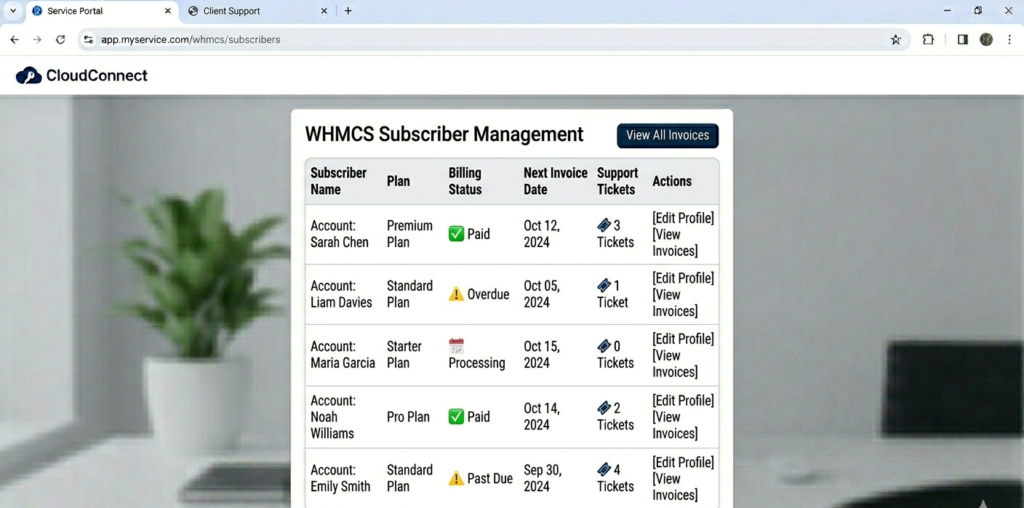
WHMCS admin panel showing subscriber list with billing status, next invoice dates, and support ticket count per account
The WHMCS-to-panel integration works via API. Your panel generates a unique API key (in the API Settings section, takes about two minutes to configure), which you enter into the WHMCS IPTV module. Once connected, account creation in WHMCS triggers account creation in your reseller panel automatically. Payment confirmation in WHMCS triggers account activation or renewal in the panel. The two systems stay synchronized without manual data entry between them.
IPTV CRM Functionality: Using Client Data Properly
CRM, Customer Relationship Management, sounds like enterprise software language, but in the reseller context it just means having organized, accessible client information that helps you support and retain subscribers.
The CRM functionality in the advanced panel stores:
- Contact information per account
- Subscription history (plans purchased, renewal dates, changes)
- Support interaction history
- Device and connection information
- Notes you add manually per account
The support history element is the most practically useful. When a subscriber contacts you with “my connection isn’t working,” you can open their account and see: they contacted you three weeks ago with the same issue, it was resolved by clearing the app cache. You resolve it again in 90 seconds instead of starting from scratch.
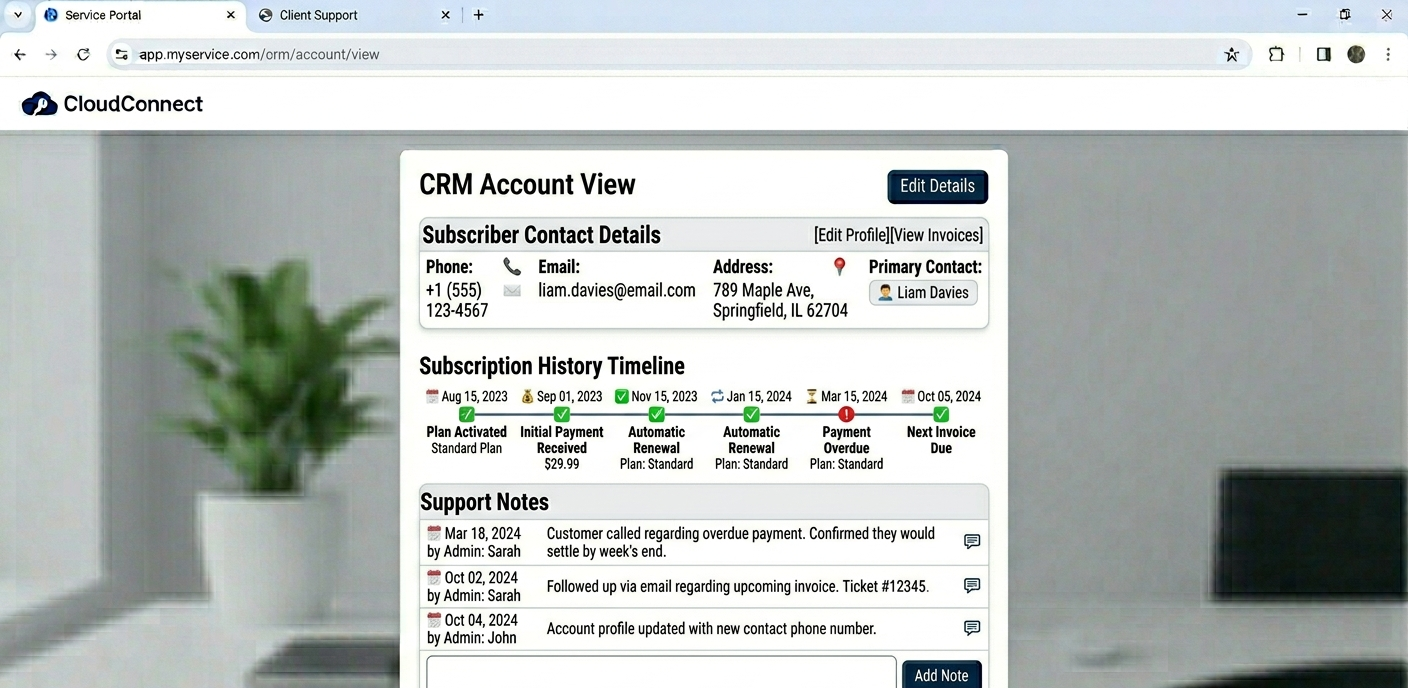
CRM account view showing subscriber contact details, subscription history timeline, and support notes
The contact information storage is also useful for proactive renewal campaigns. Before the automated reminder goes out, you can pull a list of accounts expiring in the next 14 days and send a personal message alongside the automated one, particularly effective for annual plan upselling at the monthly renewal point.
Account Creation and Billing Workflow
| Step | Action | Tool | Time | Outcome |
|---|---|---|---|---|
| 1 | Customer pays | Pricing page / WHMCS | – | Payment confirmed |
| 2 | WHMCS creates order | Automated trigger | ~5 sec | Account queued |
| 3 | Panel account activated | API integration | ~10 sec | Credentials generated |
| 4 | Welcome email sent | WHMCS automation | ~15 sec | Client receives login |
| 5 | Account logged in CRM | Automatic | ~5 sec | Support history starts |
| 6 | Renewal reminder scheduled | Subscription Settings | – | 7-day, 3-day triggers set |
Total time from payment to client receiving credentials: under 60 seconds with full automation configured. Without automation, this process is 5–10 minutes of manual work per subscriber, which at 15 new sales per day is over two hours of daily administrative work that could be eliminated.
Key Features Worth Configuring Carefully
Subscription Management
The Subscription Management section in User Management tracks every account’s lifecycle. From here you can extend plans without generating new credentials (important for subscriber experience, they don’t need to reconfigure devices), move subscribers between plan tiers, and see the full renewal history per account.
One operational habit worth building: check the “expiring soon” filtered view every Monday morning. It shows accounts expiring in the next 7 days. Review this list and add manual notes to any accounts where you have context, a subscriber who mentioned they were going on holiday, one who asked about upgrading, one who’s had repeated technical issues. That context makes your renewal outreach more targeted and more effective.
Automated Renewal Configuration
The renewal automation settings are in Subscription Settings, not the main Account section, took me a few minutes to find this the first time. Configure reminder intervals here: I use 7 days, 3 days, and 1 day before expiry as the standard cadence. Each trigger generates an automated notification and flags the account in the renewal queue on your dashboard.
One thing the documentation doesn’t emphasize clearly: the automated reminders only send if you have email integration configured. If you haven’t connected an SMTP server or email service, the reminder triggers fire internally but no email goes to the subscriber. Check your email configuration in the Notifications Settings section before assuming automation is working end-to-end.
Analytics for Billing Optimization
The analytics section provides data directly relevant to billing strategy:
Plan type distribution: what percentage of subscribers are on monthly vs. multi-month plans. If monthly plans dominate your subscriber base, you have a churn risk problem and a cash flow problem simultaneously.
Revenue trend by month: whether your effective monthly revenue is growing, flat, or declining. A growing subscriber count with flat or declining revenue usually means churn is eating into your base.
Renewal rate by plan type: which plan durations renew at the highest rates. In most operations, annual plan subscribers renew at significantly higher rates than monthly subscribers.
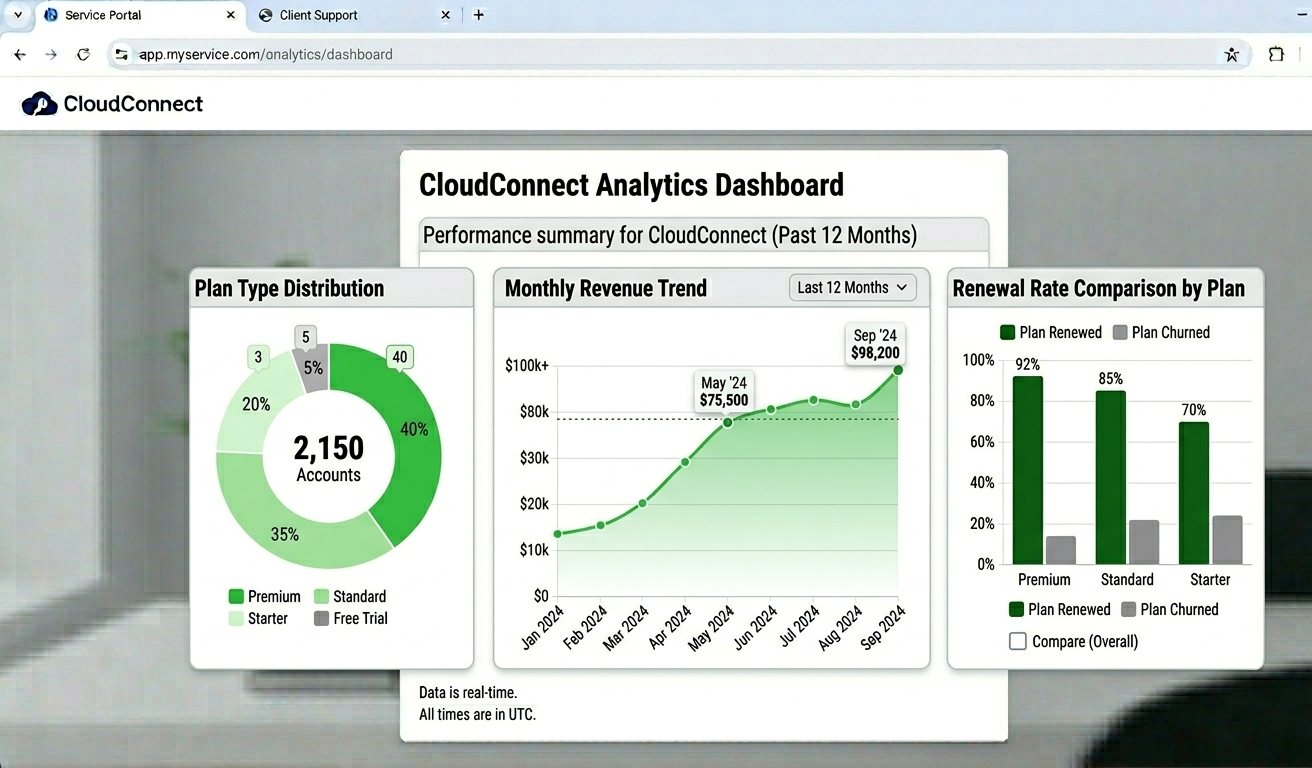
Analytics dashboard showing plan type distribution chart, monthly revenue trend, and renewal rate comparison by plan
What Most Billing Guides Don’t Tell You
Automated Reminders Don’t Guarantee Renewals
The renewal reminder system notifies subscribers that their account is expiring. It doesn’t persuade them to renew. The renewal rate on automated reminders alone is lower than most guides imply.
What genuinely improves renewal rates is the combination of automated reminders plus a reliable service history plus occasional personal contact at key points. A subscriber who’s had three unresolved support issues in the last month is unlikely to renew regardless of how many automated emails they receive. The billing system surfaces the opportunity; your service quality determines whether they take it.
Credit Deduction Timing Creates Cash Flow Asymmetry
If you’re running annual plans and deducting 12 credits upfront at activation, your credit costs front-load against revenue that comes in as a lump sum. This works well for cash flow when you’re growing, annual plan revenue comes in immediately. It becomes a problem if you’re using those credits for a supplier that your subscriber then cancels or charges back after three months. You’ve spent 12 months of credits for three months of revenue.
Annual plans should come with clear terms about your refund policy for early cancellations. Define this before you start selling annual plans, not after your first difficult cancellation conversation.
WHMCS Has a Learning Curve
WHMCS is powerful and industry-standard, but the initial configuration is not trivial. Setting up the API integration with your UK IPTV panel, configuring payment gateways, building automation rules, and customizing the client portal takes several hours for someone doing it for the first time. The documentation is extensive but dense.
Budget a full day for initial WHMCS configuration. Don’t set it up while you have pending subscriber activations waiting, the chance of misconfiguring something and having a subscriber receive a broken onboarding experience is real during initial setup.
Subscription Gaps Cost More Than You Think
A subscription gap is when a subscriber’s account expires, they don’t renew immediately, and they come back three days later wanting to reactivate. If your automation suspended their account at expiry rather than leaving it active, they’ve had three days of no service, and they’ll mention it. If your credits are already deducted for a new period when you reactivate, you’ve lost three days of their paid period.
Configure your suspension timing and reactivation policy deliberately. A 3-day grace period after expiry (account stays active but flagged as expired) before suspension reduces the subscriber friction of short renewal delays, at a modest cost to your credit management.
Real Setup Mistakes and What Fixed Them
Mistake 1:
Not configuring email integration before enabling automated renewals. Outcome: Renewal automation was “running” but no emails were going to subscribers. Three accounts expired without any notification. All three churned. Fix: Verify end-to-end email delivery before considering automation live. Send a test renewal notification to yourself and confirm receipt before trusting the system to run autonomously.
Mistake 2:
Setting up WHMCS API integration with the test API key rather than the live key. Outcome: Account activations in WHMCS were not triggering panel account creation. First five new subscribers received no credentials. Fix: Verify your API connection in the API Settings section with a test account creation immediately after setup. Don’t wait for a real sale to discover a configuration error.
Mistake 3:
Not tracking the billing analytics weekly. Outcome: Didn’t notice that monthly plan renewal rates had dropped from 82% to 64% over six weeks. By the time it was obvious in total subscriber count, significant damage had been done. Fix: Weekly analytics review, specifically renewal rate by plan type. A declining renewal rate is an early warning that something is wrong with service quality or subscriber experience.
Mistake 4:
Running credits too close to zero during a busy period. Outcome: A batch of renewals processed and credit balance hit zero. New activations queued from WHMCS couldn’t complete until a manual top-up was processed. Fix: Set a credit floor, a minimum balance below which you trigger an immediate top-up. Keep this floor at your typical weekly activation volume as a minimum buffer.
Mistake 5:
Not configuring suspension timing deliberately. Outcome: A subscriber whose payment failed had their account suspended immediately at expiry. They paid 18 hours later and were frustrated at the interruption. Fix: Configure a 48-hour grace period between expiry and suspension. Payment processing delays, bank weekends, and customer notification delays make immediate suspension unnecessarily aggressive for most situations.
Who This Setup Is Not For
If you need highly customized billing logic, variable pricing tiers, volume discounts, corporate invoicing with purchase orders, or multi-currency billing with real-time conversion, WHMCS can handle some of this but requires significant configuration effort and potentially paid add-ons. Verify the billing complexity you need is supported before committing.
If you’re managing fewer than 20 subscribers and are genuinely happy doing manual renewals, the complexity of a full WHMCS integration is probably overkill at that scale. Native panel billing handles small operations adequately. Set up WHMCS when you’re ready to scale, not as a day-one requirement.
If your subscriber base is in markets where your chosen payment gateways don’t operate effectively, WHMCS’s gateway diversity helps but can’t solve fundamental payment infrastructure gaps in specific regions.
Basic vs. Advanced Panel for Billing Operations
| Feature | Basic panel | Advanced panel |
|---|---|---|
| Automated renewals | Manual only | Automated with triggers |
| CRM functionality | None | Full client history |
| Reporting | Simple account list | Deep analytics |
| API access | No | Full API for WHMCS integration |
| Auto credit top-up | No | Available |
| Email notifications | Basic | Configurable per event |
| Multi-staff access | No | Yes |
A proper automated billing operation requires the advanced panel, the API access for WHMCS integration specifically is not available on basic configurations. If billing automation is your goal, the advanced tier is the starting point.
Best Practices for UK, USA, and EU Markets
Invoice documentation: UK and EU subscribers frequently operate in environments where invoice documentation is expected or required for tax purposes. Professional invoicing through WHMCS satisfies this expectation and reduces support requests about billing documentation.
GDPR and data handling: if you’re collecting subscriber data from EU or UK residents, your CRM data storage and email marketing must comply with GDPR/UK GDPR. This means explicit consent for marketing communications, clear privacy policy, and data deletion processes for cancelled subscribers. The billing system collects personal data, handle it with the compliance requirements that creates.
Transparent pricing: US and UK markets respond negatively to hidden fees or unexpected charges. Your pricing page should show exactly what each plan costs, what happens at renewal, and whether pricing changes on renewal. Transparency at the billing stage reduces chargebacks significantly.
Payment timing expectations: annual plan subscribers in these markets are more accustomed to annual billing cycles from streaming services (Netflix, Spotify, etc.) than you might expect. Annual plan conversion rates are often better than IPTV resellers anticipate when the pricing is clearly communicated.
FAQ
How does automated billing actually work end-to-end?
A subscriber pays through your pricing page or WHMCS portal. The payment confirmation triggers an API call to your reseller panel, which activates or extends the subscriber’s account and generates credentials. Simultaneously, WHMCS logs the transaction, generates an invoice, and sends a confirmation email. At the renewal interval you’ve configured (typically 7 days before expiry), the system sends reminder notifications automatically without any manual intervention from you.
What’s the difference between native panel billing and WHMCS integration?
Native panel billing handles credit management and basic account lifecycle tracking. WHMCS adds payment gateway diversity, professional invoicing, support ticket integration, and more sophisticated automation rules. For small operations (under 50 subscribers), native billing is usually sufficient. For scaling operations or those serving markets where professional invoicing is expected, WHMCS integration adds meaningful capability.
How do I handle failed payments?
WHMCS automation rules let you configure a failed payment workflow: reminder on day 1 after failure, account suspension on day 3, account termination on day 7. This is configurable based on your business policy. I’d recommend a suspension rather than immediate termination, suspended accounts can be reactivated when payment clears, terminated ones require creating a new account.
Can I track which billing plan types are most profitable?
Yes. The analytics section shows plan type distribution, renewal rates by plan type, and revenue contribution by plan tier. Combined, this tells you whether your annual plan subscribers are genuinely more valuable (higher renewal rates, longer average tenure) than monthly subscribers, which in most operations, they are.
How do I migrate from spreadsheet tracking to the billing platform?
Import your existing subscriber list into User Management manually or via CSV import if your panel supports it. Set each account’s expiry date correctly based on your records. Configure the automated renewal reminders before the nearest expiry dates hit. The migration itself takes a few hours for most operations; the immediate return in reduced manual work usually makes the investment obvious within the first renewal cycle.
What data security obligations do I have with billing data?
Subscriber billing data, payment information, contact details, transaction history, carries legal obligations in most markets. In the UK and EU, this data is personal data under GDPR/UK GDPR. You need a documented privacy policy, clear data retention and deletion processes, and explicit consent for any marketing use of the data. Your payment processor (Stripe, PayPal, etc.) handles card data security directly; your CRM handles contact and subscription history. Keep both secured and compliant.
Is WHMCS worth the additional cost and setup time for a small operation?
Honestly, for under 50 subscribers, probably not immediately. The setup overhead and ongoing cost are better justified once you’re handling consistent volume where the manual work WHMCS eliminates is genuinely significant. Start with native panel billing, get your operation stable, then migrate to WHMCS when billing administration starts taking meaningful time each week.
Billing infrastructure isn’t the exciting part of running a reseller operation, but it’s the part that directly determines whether your revenue is stable or constantly eroding. Automated renewals, professional invoicing, and subscriber data organized in a CRM aren’t just efficiency tools, they’re the operational foundation that makes sustainable growth possible. The platform provides the infrastructure. The habits you build around it determine whether the automation actually works as intended.