
White Label IPTV Reseller Setup: What the Dashboard Actually Does
Starting a white label streaming service is one of those business models that looks straightforward on paper and has more operational depth than most guides acknowledge. This isn’t a theoretical overview, it’s a walkthrough of what the setup actually looks like, what the dashboard does, and where people typically go wrong before they’ve built their first 50 subscribers.
Before everything else: this platform provides subscription management software and infrastructure only. It does not host television channels, stream media content, or distribute copyrighted material. The white label tools described here are for branding and managing your own subscriber operation, not for content creation or distribution.
What White Label Actually Means in This Context
White label in the IPTV reseller model means your subscribers interact with your brand, your app name, your logo, your portal URL, your support contact, without seeing the name of the underlying software provider.
From a client perspective, they download your app, log in with credentials you’ve issued, and have no visibility into the infrastructure running behind it. From your perspective, you’re operating a branded service using professional management tools without building that infrastructure from scratch.
This matters commercially for a specific reason: price tolerance. Subscribers paying for a named service they recognize, one with its own app, its own portal, its own identity, are measurably more likely to pay a premium than subscribers who feel like they’re accessing a generic IPTV reseller account. The white label layer is what creates that brand perception.
The Management Infrastructure: What You’re Actually Working With
The IPTV reseller panel is cloud-hosted backend software. No local installation required. On first login, there’s a brief 2–3 second initialization, session setup, then the interface loads. The main dashboard opens on an overview screen: active connection count, credit balance, subscriber statistics, and server health indicators.
The User Management tab is where most operational work happens. From here you can create, extend, suspend, or delete accounts; configure connection limits; apply branding parameters to credential outputs; and access the full subscriber history.
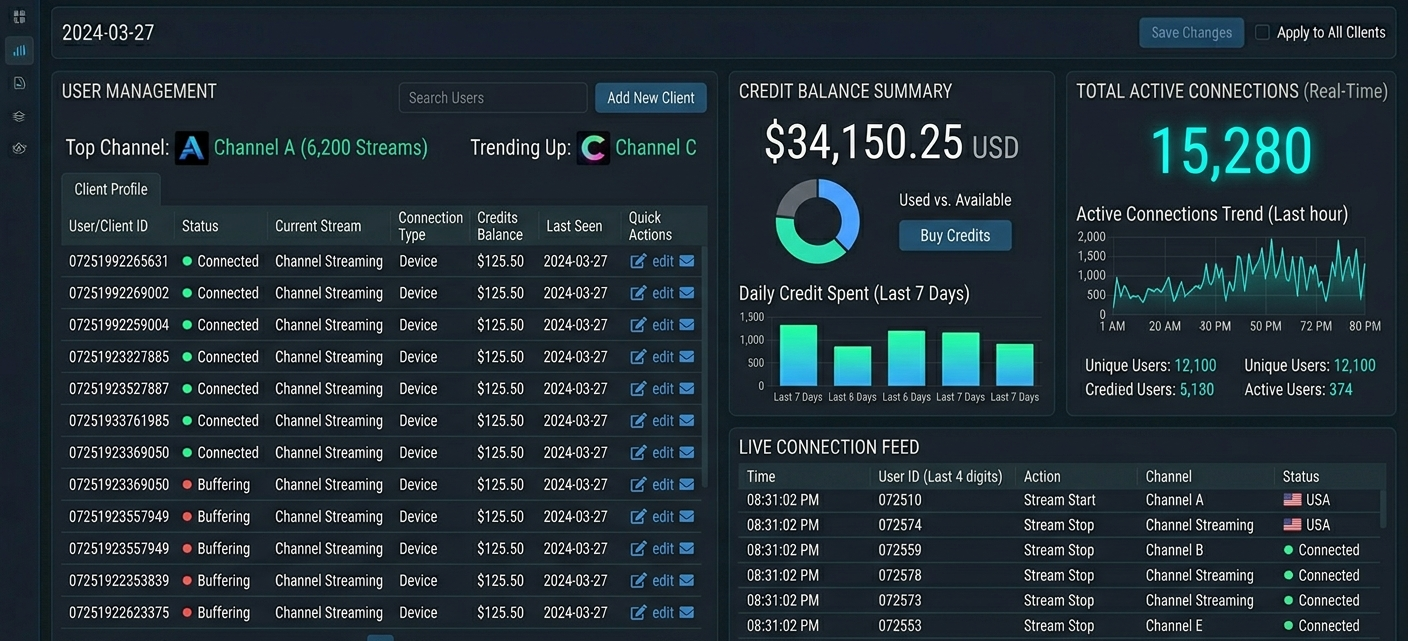
Dashboard overview showing User Management tab, credit balance widget, and active connection count
The backend logic flow for every subscriber connection:
Player app sends authentication request to the portal URL
Server checks credentials against the subscriber database
Server validates subscription status and connection limit
If valid, stream access is granted and the session is logged
If expired or over-limit, access is denied with an error return
Your management panel controls the database layer. The streaming infrastructure sits separately, managed by your master supplier. Understanding this separation is operationally important, an account that shows “active” in your panel can still fail to connect if the supplier has server issues. The two layers are independent.
Setting Up Your White Label Brand: What the Configuration Looks Like
The branding configuration is in the White Label Settings section of the advanced panel. Here’s what you can actually configure:
Portal URL:
your custom domain that becomes the server address clients enter into their player apps. This is the single most important branding element. When a client sets up TiviMate or Smarters and enters “myservice.com:8080” instead of a generic reseller URL, that’s brand reinforcement at the point of setup.
Configuring a custom domain takes about 15–20 minutes including DNS propagation check. You enter your domain in the portal configuration field, update your DNS records to point to the provided server IP, and wait for propagation. The panel shows a green indicator when the custom domain is resolving correctly. DNS propagation typically takes 5–30 minutes depending on your registrar.
Custom app branding:
if your plan includes a branded app, you submit your logo (PNG format, minimum 512x512px), your app name, and your color scheme via the branding submission form. The turnaround for a branded app build is typically 3–7 business days, significantly longer than the documentation implies. Budget accordingly and don’t promise clients a branded app experience before it’s confirmed ready.
Credential output branding:
when you generate subscriber credentials, the output can include your brand name and portal URL rather than generic identifiers. This is configured in the Account Settings section. Takes about two minutes to set up.
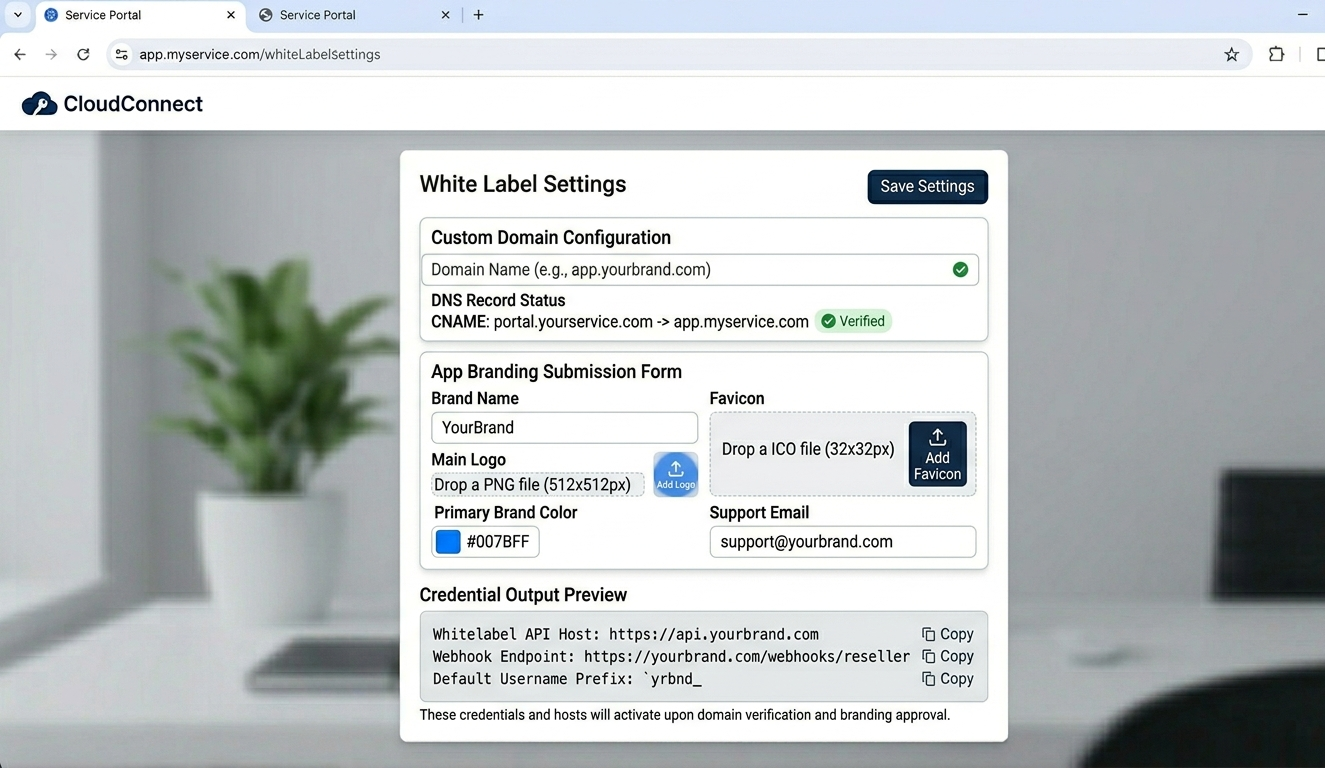
White Label Settings panel showing custom domain field, app branding submission form, and credential output preview
Account Creation Workflow: Step-by-Step With Real Timing
| Step | Action | Panel location | Time | Outcome |
|---|---|---|---|---|
| 1 | Log in | Login screen | ~3 sec | Dashboard loads |
| 2 | Navigate to users | User Management tab | ~2 sec | Subscriber list renders |
| 3 | Open creation form | “Add User” button | ~1 sec | Form appears |
| 4 | Enter username | Data entry field | ~10 sec | Identity set |
| 5 | Select plan | Subscription dropdown | ~5 sec | Duration configured |
| 6 | Set connection limit | Connection Manager field | ~5 sec | Device cap applied |
| 7 | Generate account | Click ‘Create’ | ~8 sec | Branded credentials generated |
| 8 | Copy and send | Credentials panel | ~10 sec | Client receives branded login |
Total time from login to credentials ready: 45–60 seconds when you know the layout. The Plan Selection dropdown and Connection Manager field placement aren’t immediately obvious on first use, budget 4–5 minutes your first few times through.
With custom domain configured, the M3U URL and Xtream Codes portal URL in the credential output will show your domain rather than a generic server address. Verify this is displaying correctly after your DNS setup before issuing credentials to paying clients.
Key Platform Features Worth Understanding in Depth
Subscription Management
The User Management tab tracks every account: creation date, expiry date, current status, connection activity, and plan type. For a branded service, the subscription extension feature is particularly important, when clients renew, you extend their existing account rather than creating a new one. They keep their credentials, their devices stay configured, and the renewal is seamless. That’s the experience a branded service should deliver.
One rule that prevents a recurring problem: never delete an account without confirming the client won’t return. Deleting is permanent; credits are not refunded. Suspend first, wait 90 days minimum, then delete. I’ve had clients return after two months of silence wanting to renew, a suspended account is recoverable, a deleted one isn’t.
Analytics for Brand Development
The analytics section provides data that’s directly useful for building a branded service:
Device type breakdown shows whether your subscribers are primarily Firestick, Smart TV, mobile, or PC users. This determines which setup guides to prioritize and which app interface to showcase in your marketing.
Peak usage windows show when your subscribers are most active. For a white label service, this is relevant for when to test stream quality and when to schedule any maintenance communication.
Per-channel popularity data shows what your specific subscriber base actually watches, useful for supplier package selection and for marketing copy that resonates with what clients actually care about.
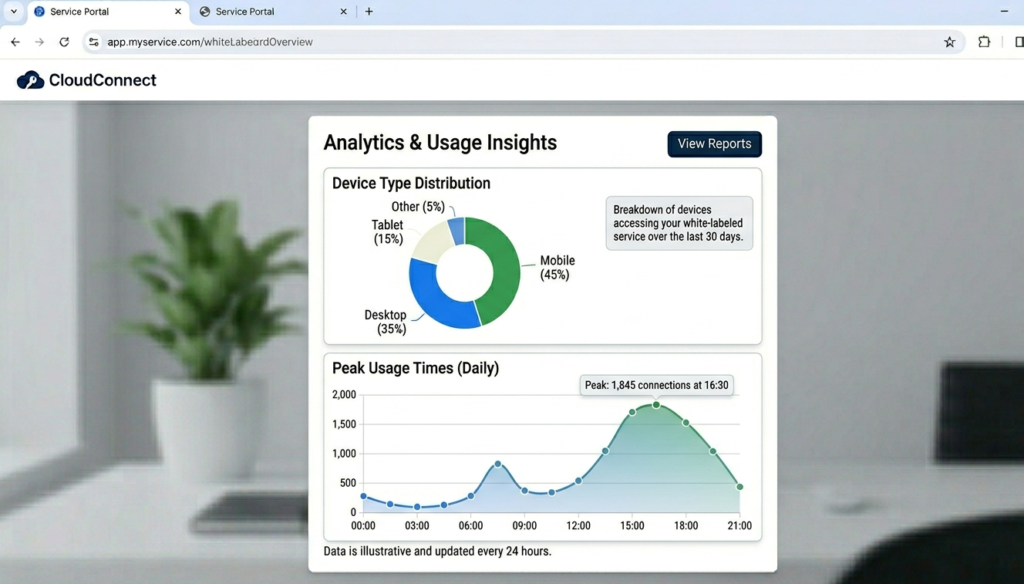
Analytics section showing device type distribution chart and peak usage time graph
Custom App Integration
The branded app is the most visible white label element and the one that requires the most lead time. The submission process involves providing logo assets, color codes, and app store metadata through the branding portal. The resulting app is built on the standard platform framework with your branding applied.
A few practical points on this:
The app requires client-side installation, which adds a step to your onboarding. For Smart TV clients especially, guiding someone through an app sideload or store installation needs to be in your setup documentation before you start offering this as a feature.
App updates go through the same build process. If the underlying platform updates and your branded app needs to follow, that’s another 3–7 day turnaround. Build this into your client communication expectations.
For clients who just want to get started quickly, standard compatible apps (TiviMate, Smarters) with your portal URL entered as the server address delivers the branded experience at the credential level without the app installation complexity. Many white label operators use standard apps initially and introduce the branded app as an upsell or as the operation matures.
What Most White Label Guides Skip Over
Your Portal URL Uptime Depends on Your Supplier, Not Your Branding
The custom domain creates the brand experience. The actual service reliability depends entirely on your master supplier’s infrastructure. If your supplier has server issues, your branded portal URL goes down alongside their generic one, there’s no resilience benefit from white labeling.
This is why supplier selection and ongoing supplier monitoring matters more than the branding configuration. A well-branded service built on a poor-quality supplier delivers a poor-quality experience with a professional appearance. That’s actually worse than a generic service that works reliably, because the brand creates elevated expectations that the infrastructure then fails to meet.
The “Instant” App Takes Time
Every white label guide describes getting your own branded app as a straightforward process. The reality is that there’s a build and review pipeline involved. First submission, depending on platform and any required revisions, can take anywhere from three days to two weeks. If you’re planning to launch with a branded app on day one, start the submission process before you start marketing.
Multi-Region Operation Requires More Than the Panel
The management platform handles multiple subscriber regions without issues, you can have subscribers in the UK, USA, and Germany managed from the same dashboard. What it doesn’t handle is the legal compliance, payment processing, and language/support requirements specific to each region.
UK subscribers operate under UK GDPR and the Data Protection Act 2018. EU subscribers under GDPR. US subscribers have state-level privacy law considerations (CCPA in California, for example). Running a genuinely multi-region white label operation means addressing these requirements in your terms of service and privacy policy, not just configuring the panel to accept international signups.
Password Sharing Will Happen
Without proactive connection limit enforcement, password sharing erodes your credit balance and your supplier’s server capacity. Set connection limits on every account at creation, every single time. One connection for standard plans, two for premium tiers. It’s a 5-second step in the Connection Manager field that prevents an ongoing problem. I’ve seen single accounts generating traffic consistent with 8–10 simultaneous users because the connection limit was left unconfigured.
Real Setup Mistakes and How to Fix Them
Mistake 1:
Launching the branded portal URL before testing DNS resolution properly. Outcome: Sent custom domain credentials to first ten clients. Domain hadn’t fully propagated for all DNS resolvers. Some clients couldn’t connect, some could. Support messages immediately. Fix: Use a DNS propagation checker after setup and test the portal URL from multiple networks (a mobile connection and a home broadband, at minimum) before issuing any credentials using the custom domain.
Mistake 2:
Not configuring branding on credential output before creating first accounts. Outcome: First batch of subscriber credentials showed the generic panel domain rather than my custom portal URL. Had to reissue credentials after configuration was corrected. Fix: Complete the full White Label Settings configuration, custom domain, credential output branding, portal URL, before creating any subscriber accounts. Check the credential preview in the settings panel to confirm it looks correct.
Mistake 3:
Promising a branded app before confirming the build timeline. Outcome: Told first 20 subscribers they’d receive a branded app within 48 hours based on documentation suggesting a short turnaround. Actual build took six days. Credibility damage before the service even launched properly. Fix: Never commit to an app delivery date based on estimated timelines. Only confirm availability after the build is complete and tested.
Mistake 4:
Ignoring the analytics device breakdown. Outcome: Built setup documentation only for Firestick. Discovered from support messages that 40% of subscribers were on Smart TVs and had no guidance. Fix: Pull the device type data from analytics after your first 20–30 subscribers. Build setup guides for the top three device types your actual subscriber base uses.
Mistake 5:
Not enabling 2FA on the admin account. Outcome: Received a suspicious login notification from an unrecognized location. Nothing compromised, but the vulnerability was real. Fix: Enable two-factor authentication in Account Settings on day one. It’s not in Security Settings where you’d naturally look for it, that costs you a few minutes the first time.
Who This Is Not For
White label IPTV operations have specific requirements. Be clear-eyed about whether they match your situation.
If you want a fully hands-off operation, this isn’t it. Subscribers contact you. Renewals need managing. The brand relationship, which is the whole point of white labeling, requires ongoing maintenance and communication. The software handles logistics, not relationships.
If your primary market requires custom billing logic (invoicing, variable pricing tiers, corporate accounts), the credit-based system will require workarounds. Verify that the billing functionality matches your intended pricing structure before committing to the white label setup.
If you’re not prepared to invest in setup documentation for your specific device mix, expect a disproportionate support volume. A branded service carries higher client expectations. When setup fails, they contact you as the brand owner, not a generic IPTV reseller they don’t have any relationship with.
If you need guaranteed support SLA from the platform, verify this before committing. Response times vary and there’s no visible SLA in the standard support portal. For a branded service where your reputation is on the line, the platform’s support responsiveness during incidents is relevant to your risk profile.
Reseller Model vs. Building Your Own Infrastructure
| Factor | Reseller model | Proprietary server |
|---|---|---|
| Startup cost | Low | Very high |
| Setup time | Hours to days | Months |
| Technical skill | Basic | Advanced, networking, encoding, Linux |
| Content control | Supplier’s lineup | Full, with full legal responsibility |
| Maintenance | Provider handles | Constant |
| Branding capability | Full white label | Full |
| Content licensing | Supplier’s responsibility | Entirely yours |
The content licensing row is the one most people dismiss too quickly. Building your own streaming infrastructure means content distribution obligations are entirely your legal responsibility. In the USA and UK, that’s a serious financial and legal exposure. The UK IPTV panel model, using management software, keeps content distribution responsibility with the supplier. Your white label brand is the customer-facing identity, not the content delivery layer.
Basic vs. Advanced Panel for White Label Operations
| Feature | Basic panel | Advanced panel |
|---|---|---|
| Custom domain/portal URL | No | Yes |
| Branded app support | No | Yes |
| Custom credential branding | Limited | Full |
| White label interface | No | Yes |
| Multi-staff access | No | Yes |
| Sub-reseller accounts | No | Yes |
| Analytics depth | Basic | Real-time per-channel |
| API access | No | Full |
A genuine white label operation requires the advanced panel. The basic configuration doesn’t include custom domain support or branded app capability, the two features that create the actual white label experience. If you’re planning a branded service, the advanced tier isn’t optional.
Best Practices for UK, USA, and EU Markets
Pricing structure that converts: three-tier pricing works consistently, a monthly entry plan, a 3–6 month mid-tier, and an annual plan positioned as the clear value option. Display these on a clean pricing page with the annual plan highlighted. Subscribers who can see the per-month cost comparison between monthly and annual plans make the calculation themselves. The annual plan should offer a meaningful discount, typically equivalent to 2 free months, to make the math obvious.
Language matters more than you think: for European markets, interface language and support language matter significantly to conversion and retention. If you’re targeting non-English markets in Europe, a support setup that can communicate in the subscriber’s language is as important as having a translated pricing page.
Local payment methods: UK subscribers expect card payments; some EU markets have strong preferences for local payment methods (iDEAL in Netherlands, SEPA in Germany, etc.). Your payment setup needs to match the expectations of your target market or you’ll lose conversion at the final step.
Proactive renewal communication: a renewal reminder 5–7 days before expiry, specifically mentioning the annual plan option as a renewal choice, serves two purposes: it reduces churn and it converts monthly subscribers to annual plans. Build this into your standard operation from the start.
FAQ
What does “white label” actually mean for the client experience?
Your client downloads an app or enters a portal URL that shows your brand name and logo, not the underlying software provider’s name. They receive credentials from you, contact you for support, and perceive the entire service as your product. The white label configuration handles the brand layer; the subscriber never sees the infrastructure behind it.
How long does getting a branded app actually take?
Build and delivery typically takes 3–7 business days from asset submission, though first submissions sometimes require revision rounds that extend this. Don’t commit to a launch date that depends on the app being ready until you have it confirmed in hand.
Can I run subscribers in multiple countries from the same dashboard?
Yes. The panel has no geographic restriction on subscriber management. The operational considerations are support (time zones, language), payment processing (local payment methods), and legal compliance (GDPR, CCPA, UK GDPR depending on regions). The platform handles the technical multi-region operation; the compliance and localization requirements are your responsibility.
What happens to my branded service if my master supplier has issues?
Your service goes down with theirs. The custom domain and branding don’t provide any infrastructure resilience, they’re presentation layers on top of the supplier’s infrastructure. This is why supplier selection matters so much, and why experienced operators maintain a backup supplier relationship. Your brand takes the reputation hit when the underlying infrastructure fails.
How do I set up the custom portal URL?
Enter your domain in the White Label Settings section, then update your DNS records to point to the provided server IP address. The panel shows a status indicator when the custom domain resolves correctly. Use a DNS propagation checker and test from multiple network types before issuing any credentials using the custom domain.
Do I need to build my own website to run a white label service?
A basic landing page with your brand name, pricing, and a contact method is enough to start. It doesn’t need to be elaborate, what matters is that it exists as a credible brand presence. Subscribers who search your brand name should find something professional. An empty or generic page undermines the white label brand credibility you’re building through the app and portal configuration.
What’s the most common reason white label operations fail early?
Supplier quality. A well-branded service built on an unreliable infrastructure fails publicly, the brand creates the expectation, and the infrastructure failure is what subscribers experience and talk about. Test your supplier thoroughly before building the brand around them. A service that works reliably under a generic name is a better foundation for white labeling than a poor-quality service with a professional appearance.
The white label model creates a legitimate competitive advantage, brand recognition, price tolerance, and subscriber retention all improve meaningfully when clients interact with a consistent branded experience. The platform provides the tools to build that experience. The outcomes depend on supplier quality, operational discipline, and the brand and support investment you make around those tools.