
How to Choose a Wholesale IPTV Supplier: A Reseller’s Guide
Finding a good wholesale supplier is genuinely the hardest part of building a stable UK IPTV reseller Panel operation, harder than learning the panel, harder than building a customer base. A poor supplier choice will cost you customers, damage your reputation, and waste credits you can’t get back. This guide covers how to evaluate suppliers properly, what warning signs to watch for, and how the management infrastructure fits into the supplier relationship.
Before we get into it: this platform provides subscription management software only. It does not host television channels, stream media content, or distribute copyrighted material. The supplier relationship is separate from and independent of the management tools described here.
Why Supplier Selection Matters More Than Anything Else
The management platform handles your operational logistics, account creation, credit tracking, renewal automation, connection limits. It does this reliably regardless of which supplier you use. But none of that infrastructure compensates for poor upstream quality.
A supplier with inconsistent server performance will cause your subscribers to experience buffering, dropped connections, and channel outages. When that happens, your clients contact you, the brand they signed up with, not the wholesale supplier they’ve never heard of. Your reputation absorbs every service failure upstream.
Cheap credits from a poor-quality supplier aren’t actually cheap when you calculate in the churn, refund requests, and time spent on support they generate. A supplier charging 30% more per credit with 99%+ uptime is almost always the better economic choice over one offering low prices with regular issues.
What to Actually Look for in a Wholesale Supplier
Most guides say “look for reliability and uptime.” That’s not specific enough to be useful. Here’s what to actually evaluate:
Peak-hour performance:
specifically during major sports events. Champions League nights, Premier League weekends, NFL Sundays in the USA. These are when supplier servers face maximum concurrent load. A supplier that performs well at 2pm on a Tuesday can degrade significantly during a Saturday evening with high simultaneous connections. Test during these windows before committing.
Response time during an outage:
how fast does the supplier acknowledge and respond to a service issue? Test this during your evaluation period. Contact them about a minor issue and time their response. A supplier who takes 18 hours to acknowledge a connectivity problem will take the same time when your clients are offline on a Sunday night.
Channel consistency:
specific channels dropping from the lineup without notice is a common issue with lower-quality suppliers. Check the channel list at the start and end of your testing period. If channels have disappeared or changed without communication, that’s operational behavior you’ll experience as a customer.
Trial period policy:
legitimate wholesale suppliers offer trial account access specifically for testing. A supplier who won’t provide a test account before you commit to a credit purchase is either confident in their product or hiding something. Either way, don’t buy without testing.
Direct sourcing vs. reselling:
there are primary suppliers who own and manage their own server infrastructure, and there are intermediary resellers who are themselves buying from primaries. Intermediary pricing tends to be higher, and you have one more layer between you and the actual infrastructure when problems occur. Ask specifically whether the supplier owns their server infrastructure directly.
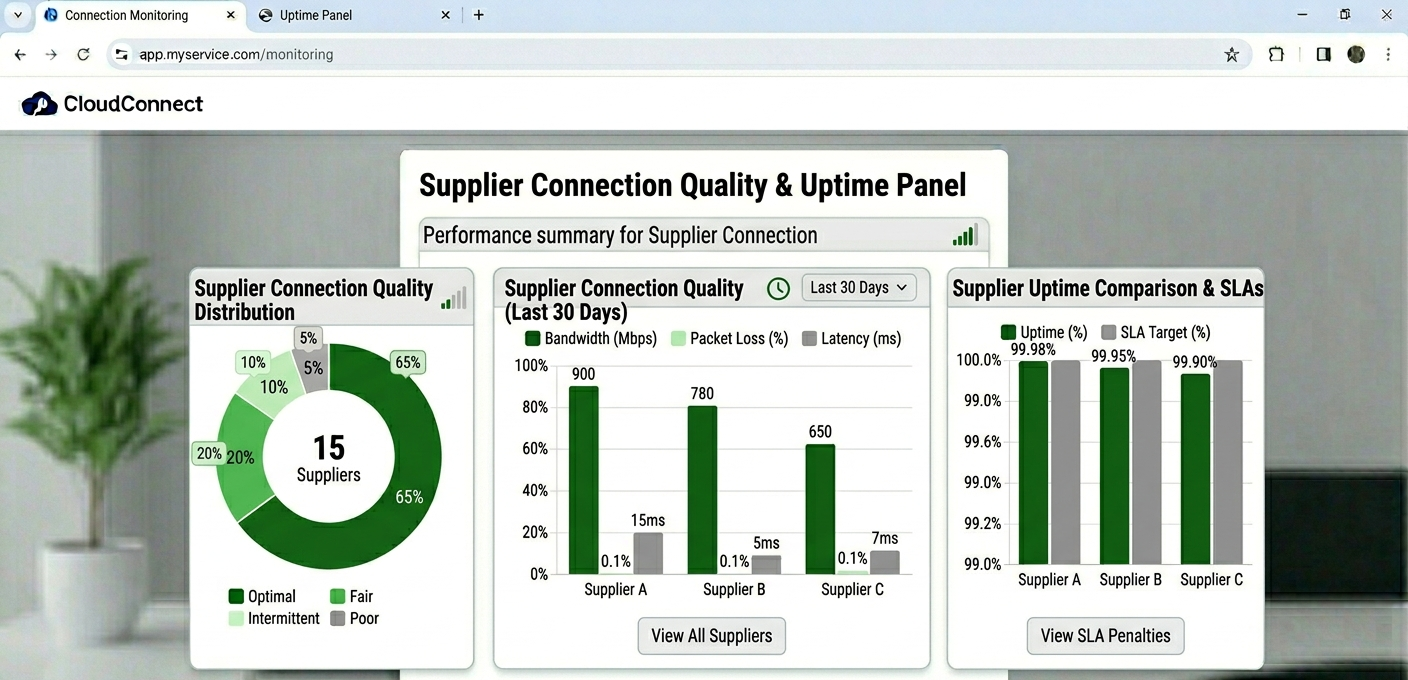
Dashboard showing supplier connection quality metrics and uptime monitoring panel
How to Test a Supplier Before Committing
This is the process worth actually following rather than assuming a quick check is sufficient.
Step 1: Request a 24–48 hour trial account. Any serious wholesale supplier will provide this. Load the credentials into your own player apps, at minimum test on Android TV or Firestick, iOS, and a Smart TV if you have one. These are the device types your subscribers will use.
Step 2: Test across content categories. Don’t just test one channel and call it done. Check live sports if available, news channels, entertainment, and VOD if the package includes it. Problems often show up in specific content categories rather than across the board.
Step 3: Test at peak hours. Log in on a weekend evening. If there’s a major sports event during your trial window, test specifically during it. Note any buffering, loading delays, or channel failures.
Step 4: Check EPG data quality. Load the Electronic Program Guide in your player app. Is it populated? Is it accurate? EPG issues are one of the most common subscriber complaints, and poor EPG data from a supplier means your clients won’t have program guide functionality.
Step 5: Test the Xtream Codes credentials specifically. Load them in Smarters or TiviMate using the Xtream Codes login method. Verify that the portal URL, username, and password all work and that the full channel list loads. Some suppliers have M3U-only configurations that don’t work properly with Xtream Codes authentication, this matters if your subscribers prefer Xtream Codes format.
![[IMAGE: Supplier test account loaded in TiviMate showing EPG guide and channel category structure]](https://martcarto.shop/wp-content/uploads/2026/03/zain-1-1024x502.png)
Supplier test account loaded in TiviMate showing EPG guide and channel category structure
The Panel’s Role in Supplier Management
Your IPTV Panel reseller dashboard is where you manage the subscriber layer that sits on top of your supplier’s infrastructure. Understanding how they connect is operationally important.
When you create an account in the User Management tab, the panel connects via API to your supplier’s server and creates a subscriber record in their database. The credentials generated, the M3U URL and Xtream Codes portal/username/password, authenticate against that supplier’s server in real time every time a subscriber connects.
This means your panel’s account management tools are effective regardless of which supplier you use. You can switch suppliers by updating the server configuration in your panel settings without subscribers necessarily noticing, if you manage the transition correctly.
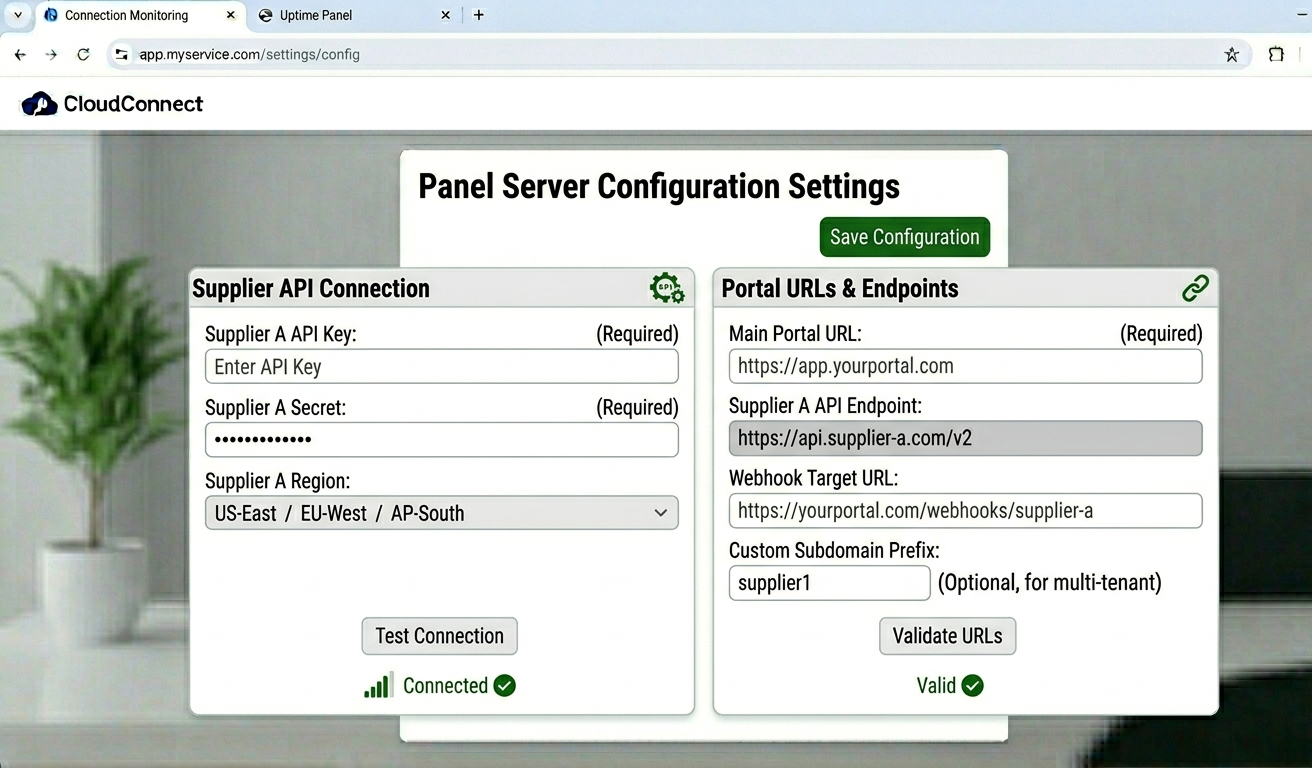
Panel server configuration settings showing supplier API connection and portal URL fields
The analytics section in your dashboard provides useful supplier monitoring data:
- Connection failure logs show when authentication requests fail, spikes here often indicate supplier server issues before clients contact you
- Active connection counts per channel give you visibility into which content is working and which isn’t
- The server load monitor refreshes every 30 seconds and shows you real-time connection health
Getting into the habit of checking the connection failure logs daily takes about two minutes. It’s the fastest way to catch supplier issues before they become client complaints.
Bulk Credits: Buying Smart
Most suppliers offer credit pricing on a tiered basis, larger credit purchases come at lower per-credit costs. The economics favor buying in larger quantities, but there’s a balance to strike.
Buying 500 credits at a lower unit price makes sense if your operation is large enough to use them within a reasonable timeframe and if you’ve already verified the supplier’s quality. Buying 500 credits from a supplier you haven’t properly tested is an expensive mistake if their performance turns out to be poor.
A sensible initial approach: buy a smaller starter quantity (50–100 credits) at the less favourable unit price to establish a real-world track record with the supplier. Once you’ve verified consistent performance over four to six weeks, move to larger bulk purchases. The per-credit savings on larger purchases are real, but they’re not worth the risk of committing large sums to an unproven supplier.
Credits in most platforms don’t expire, so there’s no urgency pressure to buy more than you need at any given time. Don’t let supplier sales pitches for “limited time” bulk discounts pressure you into over-purchasing before you’ve established trust in their infrastructure.
Account Creation Workflow With a New Supplier
Once you’ve selected a supplier and configured their credentials in your panel, the account creation process looks like this:
| Step | Action | Panel location | Time | Outcome |
|---|---|---|---|---|
| 1 | Log in | Login screen | ~3 sec | Dashboard loads |
| 2 | Check credit balance | Credit balance widget | ~5 sec | Verify sufficient credits |
| 3 | Navigate to users | User Management tab | ~2 sec | Subscriber list renders |
| 4 | Open creation form | “Add User” button | ~1 sec | Form appears |
| 5 | Enter username | Data entry field | ~10 sec | Identity set |
| 6 | Select plan duration | Subscription dropdown | ~5 sec | Plan configured |
| 7 | Set connection limit | Connection Manager field | ~5 sec | Device cap applied |
| 8 | Generate credentials | Click ‘Create’ | ~8 sec | Login details generated |
| 9 | Test before sending | Personal test device | ~2 min | Verify account works |
| 10 | Send to client | Credentials panel | ~10 sec | Client receives login |
Step 9 is the one most resellers skip. Testing a newly created account yourself before sending credentials to a client takes two minutes and prevents the most embarrassing possible support situation: a client who can’t connect because of an account configuration issue you could have caught first.
What Most Supplier Guides Don’t Tell You
Uptime Claims Are Marketing, Not Guarantees
Suppliers advertising “99.9% uptime” are providing a marketing figure, not a contractual SLA in most cases. The only uptime data that matters is what you observe during your testing period and what you experience as an ongoing customer. Keep your own informal notes on supplier incidents, date, duration, channels affected, response time. After three months you’ll have an objective picture of actual performance rather than marketing claims.
Supplier Quality Can Degrade Over Time
A supplier that performs excellently when you start with them can deteriorate as they onboard more resellers without proportionally scaling their infrastructure. This is one of the less-discussed risks of the reseller model. Monitor your connection failure logs consistently, a gradual increase in failure rates over several weeks often signals this kind of supplier degradation before it becomes obvious to clients.
Communication Quality During Problems Predicts Everything
How a supplier handles an outage communication tells you more about the relationship than their normal operational performance. During your evaluation period, look for how they communicate about issues. A supplier with no communication infrastructure around incidents will leave you explaining unexplained outages to frustrated clients.
Having a Backup Supplier Ready Is Not Paranoia
Experienced resellers maintain tested relationships with at least one secondary supplier. This isn’t about expecting their primary to fail, it’s about having the option to migrate clients if needed without scrambling to find and test a supplier under pressure. Keep a small credit balance with a vetted secondary supplier and test it periodically. The cost is minimal; the risk mitigation is significant.
Real Mistakes Made When Selecting Suppliers
Mistake 1:
Buying bulk credits from a supplier after a short evening test. Outcome: Purchased 200 credits. The supplier performed well on a Thursday evening but had consistent issues during weekend sports events, exactly when my subscribers most needed the service. Difficult to absorb the cost. Fix: Always test across at least one full weekend including a major sports event window before buying significant credits. One evening of testing is not sufficient.
Mistake 2:
Assuming M3U compatibility means Xtream Codes works too. Outcome: Created accounts for 15 clients and sent Xtream Codes credentials. Ten of them couldn’t connect because the supplier’s server wasn’t properly configured for Xtream Codes authentication despite the panel generating those credentials. Fix: Specifically test Xtream Codes login during your trial period, not just M3U. Load the three-field login in TiviMate or Smarters and confirm the channel list populates correctly.
Mistake 3:
Not checking the connection failure logs during the first month with a new supplier. Outcome: A specific sports bouquet had been failing intermittently for two weeks before a client mentioned it. By the time it was addressed, three clients had already complained. Fix: Daily two-minute check of the connection failure logs in the analytics section. Anything above your baseline failure rate warrants investigating immediately.
Mistake 4:
Choosing a supplier based solely on price. Outcome: The cheapest option per credit generated the most support volume by a significant margin. When the true cost including time spent on support was calculated, it was more expensive than paying more for quality. Fix: Evaluate supplier cost as total cost of ownership including expected support time, not just credit price. A £0.20 per credit difference is irrelevant if the cheaper option generates five times the support tickets.
Mistake 5:
Not having a backup supplier when the primary had a major outage. Outcome: Primary supplier had a 14-hour outage on a weekend. Had no tested alternative. Lost four subscribers during that period who couldn’t wait for resolution. Fix: Maintain a tested and credited backup supplier relationship at all times. The ongoing cost is small; the option value during an incident is significant.
Who the Reseller Model Is Not For
The reseller model is excellent for most entry-level and intermediate operations, but there are situations where it’s a poor fit.
If you require absolute control over the channel lineup, specific regional content, niche language channels, custom content packages, the reseller model won’t give you that. Your content offering is determined by your supplier’s lineup. Custom content control requires infrastructure ownership.
If you’re building for an enterprise or institutional client that needs contractual uptime guarantees and SLA documentation, wholesale supplier relationships don’t typically come with those guarantees. You can’t commit to an SLA you haven’t received.
If you’ve identified a genuinely underserved market that no existing supplier serves adequately, the infrastructure investment to build your own might eventually be justified, but the complexity, cost, and legal exposure of content distribution make that an advanced consideration, not a starting point.
Reseller Model vs. Own Infrastructure
| Factor | Reseller model | Proprietary server |
|---|---|---|
| Setup cost | Low | Very high |
| Technical skill required | Basic | Advanced |
| Content licensing | Supplier’s responsibility | Entirely yours |
| Maintenance | Provider handles | Constant |
| Supplier risk | Exists | Eliminated |
| Scaling speed | Immediate | Hardware constrained |
| Channel control | Supplier’s lineup | Full |
The content licensing row is the one that most people evaluate incorrectly. Building and operating streaming infrastructure means you’re responsible for content distribution licensing obligations, in the USA, UK, and EU, these are serious legal and financial exposures. The reseller model keeps that responsibility with the supplier while you maintain the subscription management layer.
Best Practices for Supplier Relationships
Communicate professionally. Treat your wholesale supplier relationship like a business-to-business relationship, not a consumer support interaction. Professional communication generally results in faster and more substantive responses.
Report issues with specifics. “Streams aren’t working” generates a slow, generic response. “Channel ID X has been returning HTTP 403 errors since 18:30 GMT, affecting approximately 30% of my users connecting from UK IP ranges” generates a faster, more useful response. Use the connection failure logs in your analytics panel to pull specific error data before contacting supplier support.
Monitor consistently, not reactively. Don’t check supplier quality only when clients complain. Weekly analytics review catches degrading performance before it reaches complaint threshold. This gives you time to investigate and address issues, or to initiate a supplier migration, before it becomes a client retention problem.
Keep your credits organized. Know your credit consumption rate, credits per week on average, and maintain a buffer above that. Running close to zero credits is an operational risk. If a top-up is delayed for any reason, you can’t activate new accounts or renewals.
FAQ
How do I find wholesale suppliers to evaluate?
Professional reseller communities and forums are the most reliable starting point. Established resellers discussing their supplier experiences provide more useful signal than supplier advertising. Look for forums or communities specifically oriented toward IPTV Panel resellers, Telegram groups, Reddit communities, and industry-specific forums all have active supplier discussion. Cross-reference multiple sources before shortlisting suppliers to test.
How many credits should I buy initially from a new supplier?
Start with a small quantity, 50 to 100 credits, regardless of the price incentive for larger purchases. Establish four to six weeks of real performance data before committing to larger bulk purchases. The per-credit savings on larger orders are real, but they’re not worth the risk of a large commitment to an unproven supplier.
What should I do when my supplier has a major outage?
Communicate to affected clients proactively if the outage is significant. A brief message acknowledging the issue and providing an estimated resolution window prevents frustration from escalating. Contact your supplier support with specific error details from your connection failure logs. If you have a backup supplier tested and ready, assess whether the outage duration warrants a temporary migration.
How do I switch suppliers without disrupting my subscribers?
Update the server configuration in your panel to point to the new supplier’s infrastructure. Generate new credentials for each subscriber from the new supplier’s account system. Send updated credentials to clients with a brief explanation and device-specific instructions for updating their login. Timing this during low-usage hours reduces the disruption window. The migration itself is operationally straightforward if you’ve prepared a tested backup supplier relationship in advance.
Can I use multiple suppliers simultaneously?
Yes, though it adds management complexity. Some IPTV resellers segment their subscriber base across suppliers, UK-focused content from one supplier, sports packages from another. This requires careful credential management and clear tracking of which accounts belong to which supplier. The analytics panel helps track this if your account naming conventions are consistent.
How do credits work across different suppliers?
Credits are specific to the panel and supplier relationship. Credits purchased from one supplier can’t be used with another. This is why over-purchasing credits from an unproven supplier is a risk, if you need to switch suppliers, those credits typically don’t transfer. Manage your credit balance relative to your anticipated usage with each supplier.
What’s the most important thing to test during a supplier trial?
Peak-hour performance during a high-demand event, a major sports fixture, a weekend evening. This single test tells you more about real-world performance than any amount of weekday afternoon testing. If the service is solid during maximum concurrent load, you can be reasonably confident in normal operation. If it degrades, you’ve identified the risk before committing subscriber relationships to it.
Supplier selection is the decision that determines the ceiling on what your IPTV reseller operation can achieve. The management platform can automate your operations, the billing tools can handle your renewals, and your support processes can build client loyalty, but all of it sits on the foundation of whether the streams actually work when subscribers press play. Get the supplier relationship right first, then build everything else on top of it.