
Getting Sports IPTV Right: A Reseller’s Guide to Provider Selection and Setup
Anyone can set up an IPTV subscription for casual TV viewing and get away with an average provider. Sports is different. A Premier League match that buffers during injury time or drops during a penalty shootout generates a client complaint within minutes. UFC events that freeze in the third round generate refund requests.
Sports content is live, time-sensitive, and watched by people who care deeply about uninterrupted delivery. The combination of high bitrates, simultaneous peak viewership, and zero tolerance for interruptions makes it the most demanding IPTV use case, and the one where provider infrastructure quality matters most.
This guide covers what separates good sports IPTV from bad, how to evaluate providers specifically for sports delivery, and how the management infrastructure behind professional sports streaming operations works.
What Different Sports Audiences Actually Need
Different sports audiences have different requirements. Understanding this before configuring anything saves significant troubleshooting time.
Premier League and European football:
- Sky Sports Main Event and Sky Sports Premier League (primary UK broadcast rights)
- TNT Sports (ex-BT Sport, holds Champions League rights)
- Amazon Prime Video channels for their fixture windows
- International broadcast feeds for non-UK viewers (BeIN Sports, ESPN, etc.)
NFL and North American sports:
- ESPN, ESPN2, ABC for NFL regular season and playoffs
- NFL Network for Sunday ticket equivalents
- NBA TV, NHL Network for US sports subscribers
Combat sports (UFC, boxing):
- UFC content appears on BT Sport/TNT Sports in the UK, ESPN in the US
- Major boxing events on DAZN, Sky Sports Box Office, or Showtime
- These are high-simultaneous-viewership events, and server load spikes dramatically during them
Cricket:
- Sky Cricket (UK) for international Test matches
- Willow TV for South Asian diaspora audiences in the US and UK
The practical implication is that “sports” isn’t a single server requirement. The infrastructure handling a Premier League Saturday afternoon handles a different load profile from a Champions League final, which handles a different profile again from a concurrent UFC PPV event. Good providers have infrastructure that handles all of these, not just one.
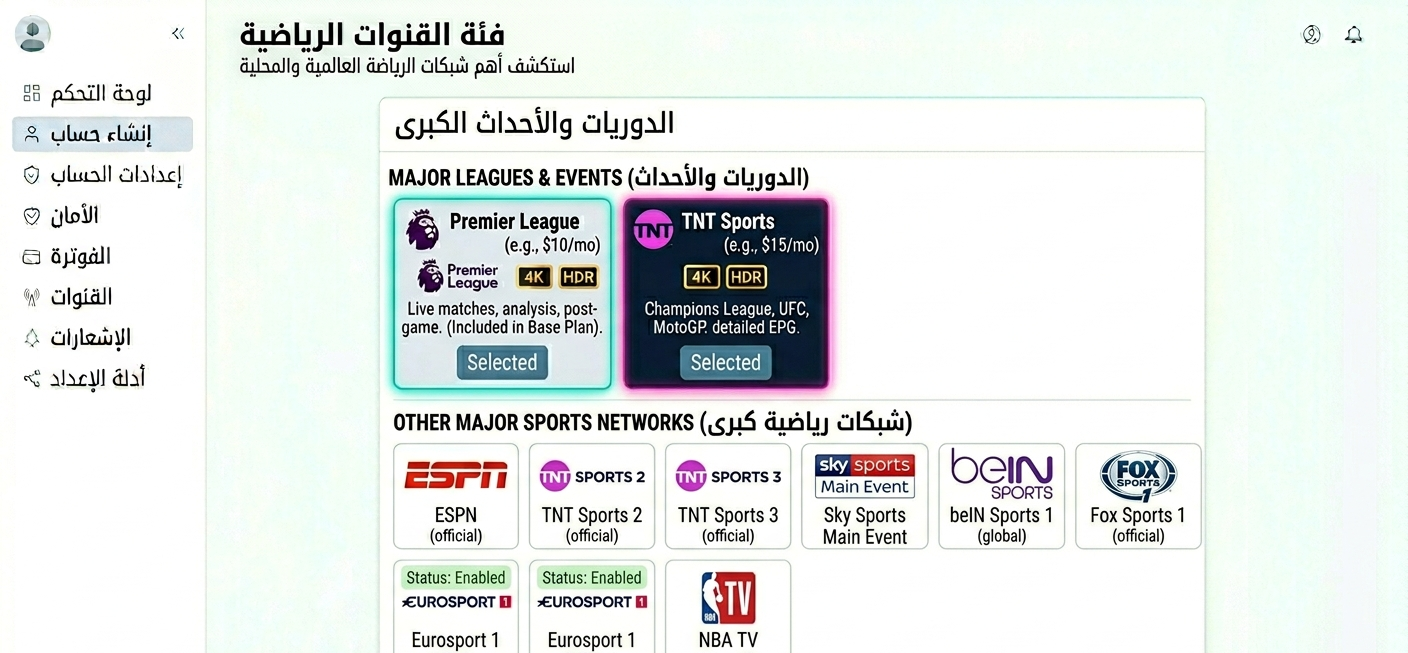
Sports channel category in IPTV app showing Premier League, TNT Sports, ESPN and other major sports networks
Testing a Provider Before You Commit to Sports Clients
This section is worth more than any list of provider names. How you test determines whether you’ll discover problems before or after you’ve sold subscriptions.
Test on an actual match day, not a Tuesday morning. I’ve evaluated providers during quiet periods who performed completely differently on a Premier League Saturday. The test that matters is under real load conditions. If you can’t test during a live event during a trial period, the trial is only telling you half the story.
Load multiple sports channels simultaneously. Sports subscribers often have multiple screens running: the main game on TV, a different match on a tablet. Open 2–3 sports streams at the same time and verify they all load cleanly. If the second stream causes the first to buffer, that’s a server load issue you’ll hear about from household clients.
Time the channel load specifically. Sports viewers are less tolerant than entertainment viewers of slow channel switching. A sports channel should load within 5 seconds. A consistent 8–12 second load time on sports channels is a noticeable friction point that generates complaints.
Test at 90 minutes into a match. Some providers perform well for the first 30–40 minutes of a live event and degrade as server load accumulates. This catches something a 5-minute test won’t reveal.
Test the EPG specifically for sports. Sports schedules change, kickoff times shift, matches get rescheduled, broadcast assignments change at short notice. A provider with an EPG that reflects current schedules accurately rather than generic placeholders is meaningfully better for sports viewers who use the guide to find what’s on.
Setting Up Sports-Focused Accounts in the Dashboard
Sports accounts have a few specific configuration considerations.
Step 1: Log in and navigate to User Management
Standard login process. The User Management tab is where all account-specific configuration happens.
Step 2: Select a plan with adequate connection limits
Sports viewing frequently happens in households where multiple people watch simultaneously, a family with a dedicated sports room and a kids’ TV, for example. Configure at least 2 concurrent connections for household sports clients. Single connections generate more support calls than any other account configuration issue.
Step 3: Verify sports channel categories are enabled
If your provider uses bouquet-based configuration (where different channel categories can be toggled per account), verify that sports channels are explicitly enabled in the account’s Bouquet Settings. I’ve had clients report missing sports channels that turned out to be a bouquet configuration issue rather than a missing channel, and it took about 3 minutes of dashboard investigation to identify.
Step 4: Configure buffer settings where available
If your panel exposes stream buffer configuration, enable buffer control for sports accounts. Without adequate buffering, streams that experience brief network fluctuations, common during peak simultaneous viewership events, will freeze rather than buffer through the dip. This took me several client complaints to diagnose the first time.
Step 5: Set up renewal reminders with sports seasonality in mind
Sports subscriptions have natural churn points: off-season periods when clients question whether they need the service. Proactive renewal reminders a week before expiry, particularly timed before the start of major sports seasons (Premier League starts August, NFL starts September, Champions League groups start September), significantly improve retention. Configure these in the Notification Settings section.
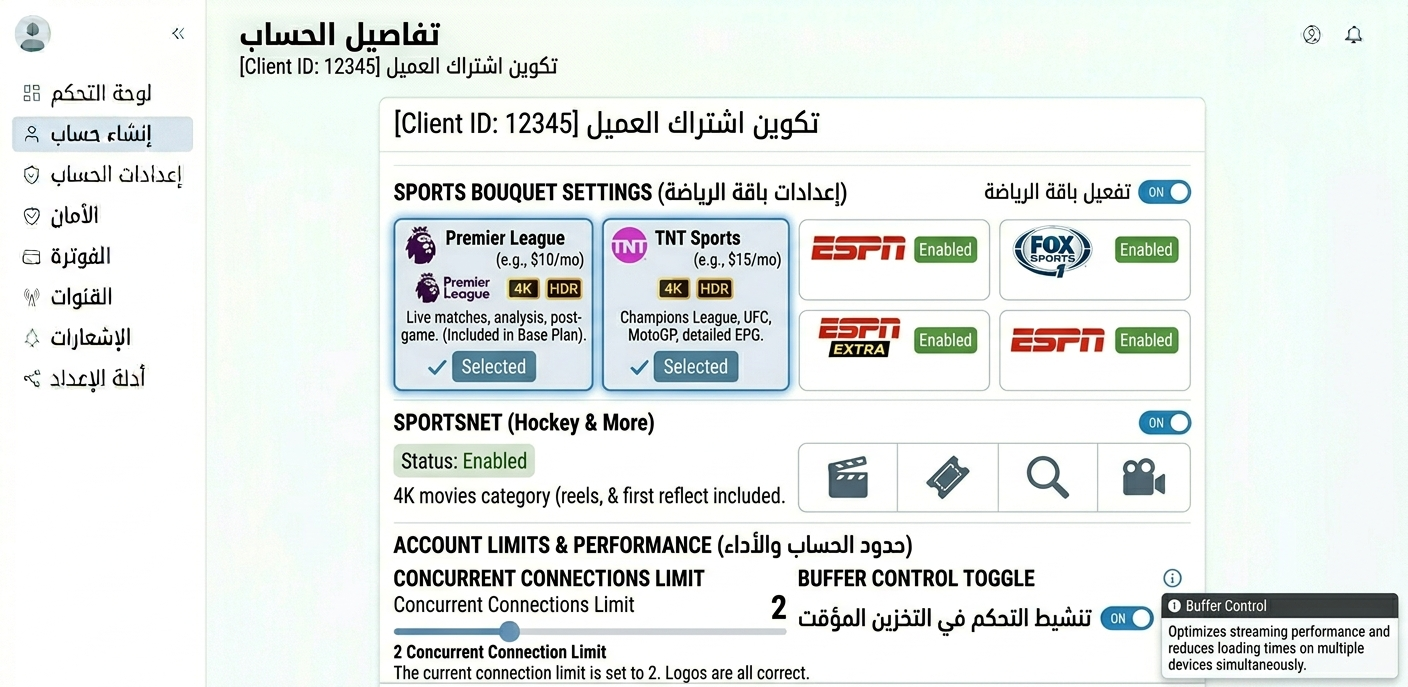
Account detail view showing sports bouquet settings enabled, connection limit set to 2, and buffer control toggle activated
The full setup sequence, from login to delivery, breaks down as follows.
| Step | Action | Where | Sports-specific notes |
|---|---|---|---|
| 1 | Log into dashboard | Main login | Standard |
| 2 | Open user manager | User management tab | Standard |
| 3 | Create account | Add new user | Standard |
| 4 | Select sports-capable plan | Plan dropdown | Verify sports channels are in the package |
| 5 | Enable sports bouquets | Bouquet settings | Confirm major sports bouquets are included |
| 6 | Set connection limit | Subscription settings | 2+ for household |
| 7 | Enable buffer control | Stream settings | Critical for live sports |
| 8 | Deduct credits | Credit system | May differ for sports-tier plans |
| 9 | Generate credentials | Cloud system | Test a sports channel before delivery |
| 10 | Deliver with sports guide | Encrypted message | Include troubleshooting for common sports issues |
Real Mistakes I’ve Made With Sports IPTV Clients
Mistake 1: Forgetting to enable buffer control
Set up a batch of new accounts on a new provider. During the first Premier League weekend, multiple clients reported streams freezing periodically, not buffering, but hard freezes for 3–5 seconds before resuming. Investigated and found that buffer control was disabled by default on the new panel. Enabled it on all affected accounts. The freezing stopped immediately. This is the single most impactful configuration step for live sports and I now check it as a standard part of every account setup.
Mistake 2: Testing mid-week, not on a match day
Evaluated a provider on a Wednesday evening: two matches running, clean streams, fast channel loading, impressed. Signed up a group of Premier League clients. That Saturday, three simultaneous Premier League matches generated a server load the provider couldn’t handle. Multiple clients had buffering on multiple channels. Had to migrate all of them within two weeks. Test on a busy Premier League Saturday or during a Champions League midweek fixture night, not on a quiet evening.
Mistake 3: Not asking about UFC event timing
Set up a client specifically for UFC events. The first major PPV event fell on a Saturday night, peak simultaneous viewership, massive server load industry-wide. The provider I was using had good regular sports performance but their servers couldn’t handle the UFC spike. Client missed the main event due to buffering. UFC events are genuinely different load conditions from regular sports. Ask providers specifically how their infrastructure handles PPV events before recommending to UFC clients.
Mistake 4: Single-connection account for a household sports subscriber
Set up a family account with one connection. The client had a dedicated sports room plus a living room TV. When both were running simultaneously during a match, the second connection kicked out the first. They thought the service had failed. Simple fix, upgraded to 2 connections, but it generated an urgent support call during a match. Now I ask about household setup during onboarding and default to 2 connections for anyone who mentions family or household use.
Mistake 5: Not having a backup plan during major events
Major events (Champions League final, Super Bowl, Grand National) generate server load that stresses even good providers. I had a situation where my primary provider had degraded performance during a Champions League final. I had no backup provider relationship established and spent the evening doing damage control with unhappy clients. Now I maintain a tested backup provider that I can point clients to during major events if primary performance degrades.
Sports Streaming Calendar: Planning for Peak Demand
Sports demand isn’t constant. It follows predictable seasonal patterns. Knowing this calendar helps you plan credit reserves, marketing efforts, and provider load expectations.
August–September: Premier League begins (massive UK demand spike), NFL starts, Champions League groups start. This is the highest sustained demand period of the year for UK and US sports IPTV.
October–November: Regular season peak for all major leagues simultaneously. NBA season starts in October, adding North American demand on top of football season loads.
December–January: Holiday period. Premier League goes into an intensive fixture schedule (26th, 28th, New Year’s Day all have Premier League matches). One of the busiest periods for UK sports IPTV.
February–March: Champions League knockout rounds. Six Nations rugby for UK viewers. NFL Super Bowl (February), the single highest simultaneous viewership event of the year for US sports.
April–May: Champions League semi-finals and final. Premier League title race conclusion. NBA and NHL playoffs begin.
June–July: Low demand period for most sports. Cricket season in the UK. Copa América and other international tournaments in alternate years.
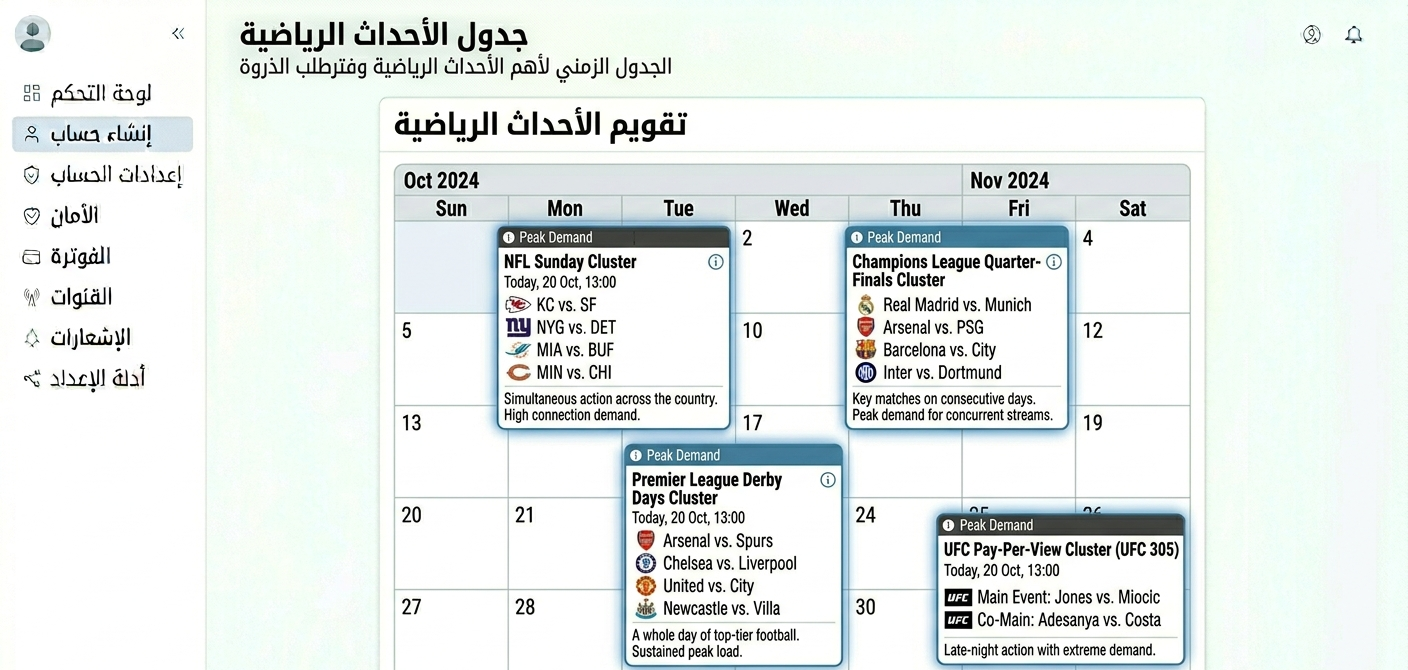
Sports calendar showing peak demand periods with Premier League, Champions League, NFL, and UFC event clusters highlighted
For IPTV UK resellers, this calendar drives two practical decisions: credit reserve management (have enough credits before August to handle the signup spike) and provider stress-testing (test specifically during August–September loads, not during the summer quiet period).
The Details Most Sports Guides Skip
Peak demand affects different sports differently. Premier League has massive simultaneous viewership in the UK but relatively low US demand. NFL has massive US demand but low UK demand. UFC events create global simultaneous spikes that hit differently from league sports. A provider that handles Premier League well may struggle with UFC PPVs, since the load patterns are genuinely different. Ask about all three.
Sky Sports rights change. Broadcast rights deals expire and get renegotiated. Sky’s deal for specific Premier League matches, BT/TNT’s Champions League rights, Amazon’s fixture windows, these shift periodically. A sports package that included everything 18 months ago may have gaps now. Verify current rights coverage annually, not just during initial provider selection.
4K sports requires significantly more bandwidth. Sky Sports and TNT Sports offer 4K streams for premium matches. 4K sports at high frame rates needs 25–40 Mbps sustained, nearly double standard HD. If you have clients expecting 4K sports on consumer broadband connections, have the bandwidth conversation explicitly before they subscribe.
Server geography affects latency for live sports. Sports viewers are acutely aware of stream delays compared to neighbours watching on cable. A stream with 20–30 seconds of latency versus live broadcast is noticeable. Server geography affects this: a stream routed through servers in geographically distant locations will have higher latency than one through servers close to the viewer. Ask providers about their UK, US, and EU server locations for sports specifically.
Boxing PPV is increasingly expensive at the provider level. Major boxing events (Anthony Joshua, Tyson Fury, etc.) are often carried on Sky Sports Box Office, a separate pay-per-view tier. Not all IPTV packages that include Sky Sports also include Box Office events. Verify this for clients specifically interested in boxing.
The gap between a basic and advanced panel becomes obvious once sports operations scale up.
| Feature | Basic panel | Advanced panel |
|---|---|---|
| Buffer control configuration | No | Yes |
| Real-time connection monitoring | No | Yes |
| Sports-specific server health alerts | No | Yes |
| Event-based notification to clients | No | Yes |
| Bandwidth usage per account | No | Yes |
| Sub-reseller sports package management | No | Yes |
| API for automated renewal during sports seasons | No | Yes |
When Sports IPTV Isn’t the Right Fit
Clients on connections below 15 Mbps. Live sports at HD quality requires consistent bandwidth. A slow or fluctuating connection produces exactly the IPTV buffering during key moments that generates complaints. Assess connection quality during onboarding and be honest if it’s unlikely to support reliable sports streaming.
Clients who expect zero delay vs. broadcast. IPTV streams have inherent latency versus live broadcast, typically 15–60 seconds depending on delivery method. Clients watching alongside neighbours with cable will notice this. Set the expectation upfront. For clients who specifically need real-time synchronisation (betting markets, pub quiz timing, etc.), this limitation matters.
Clients primarily interested in a single very high-profile event. If someone wants an account specifically for one Champions League final or one Super Bowl, the economics of a subscription may not make sense for them compared to the specific event alternatives. Be honest about this rather than upselling.
Solo operators targeting sports without a backup provider. If sports is your primary value proposition and your single provider has issues during a major event, you have no recourse and very unhappy clients. The sports market specifically requires a tested backup plan.
FAQ
Why does my sports stream buffer when other channels are fine?
Sports channels run at higher bitrates than standard entertainment channels. Where a drama series might stream at 5–8 Mbps, a Sky Sports 1080p match stream runs at 10–15 Mbps. If your connection can sustain 8 Mbps but not 15 Mbps consistently, sports channels specifically will buffer while other channels are fine. Also check whether buffer control is enabled in your account settings, without it, brief network fluctuations during peak simultaneous viewership cause hard freezes rather than smooth buffering through the dip.
Why does the Premier League stream work early in the day but buffer in the afternoon?
Saturday Premier League afternoons (12:30pm, 3pm, 5:30pm) are when server load peaks across IPTV providers globally. Millions of simultaneous connections strain server infrastructure that performs fine at lower loads. This is a provider infrastructure capacity issue. If you consistently see this pattern, your provider’s sports servers aren’t adequately provisioned for peak loads. Consider testing a different provider during a busy Saturday afternoon.
Can I watch multiple sports simultaneously on one account?
You can if your account has multiple concurrent connections configured. A 2-connection account allows two devices to stream simultaneously. Check your account’s connection limit in the dashboard, if it’s set to 1, the second device will kick out the first. Sports household accounts should have at least 2 connections.
Why is my stream 30–60 seconds behind the live broadcast?
IPTV streams have inherent delivery latency: the content is buffered and delivered over internet infrastructure rather than a direct broadcast signal. 15–60 seconds behind live is normal. If you’re watching alongside someone with a cable or satellite subscription, you’ll notice the difference. This can’t be eliminated by changing settings; it’s a characteristic of internet-based delivery.
What internet speed do I need specifically for sports?
HD sports (1080p): 15 Mbps minimum, 20 Mbps+ recommended for stable delivery. 4K sports (where available): 30 Mbps minimum, 40 Mbps+ recommended. These assume a wired ethernet connection for the streaming device. Add 30–40% bandwidth if you’re on WiFi, and verify your connection has consistent speed rather than just peak speed, since sports streaming is more sensitive to inconsistency than to raw speed.
Do I need a separate account for each sports event or does one subscription cover everything?
One subscription covers everything in the package: all IPTV channels, all matches, all events that those channels broadcast. There’s no per-event charging within a subscription. The exception is pay-per-view events on dedicated PPV platforms (Sky Box Office, etc.), verify whether these are included in your specific package or require additional access.
Why did the Champions League stream fail on the night of the final when it worked fine all season?
The Champions League final is the single highest simultaneous viewership event in European football. The server load on that night is dramatically higher than any regular season match or even semi-final. Providers that handle the regular season comfortably can struggle on final night. This is a known pattern in the industry. If you’re serving clients who specifically want Champions League final coverage, test your provider during a semi-final (almost-as-high load) to get a realistic picture of final-night performance.
Sports is the category that separates professional IPTV operators from casual ones. The testing rigor, the buffer control configuration, the connection limit planning, the seasonal load awareness, none of this is complicated, but all of it matters in ways that don’t show up until the moment a client needs the service most.
The clients who build the strongest retention in the sports market are the ones who had proactive support during a major event failure, not the ones who never had a failure (server issues are inevitable) but the ones who communicated, explained, and resolved quickly when something went wrong.
Get the provider selection right, configure accounts correctly, and be present during major events. That’s what the sports IPTV Reseller Panel market rewards.